The ONE THING to do to Get Your RSS Right
Wednesday, October 26, 2011
RSS. It's an essential technology underpinning much of the modern web's content, social or otherwise. But, like email subscriptions, it's often poorly implemented. Worse, decisions can be made "because everybody else does it this way" that can really mess things up for you later as your blog grows.
And it boils down, in many ways, to just one thing.
So here it is:
Have your feed on your own domain.
In other words, if your web site is on example.com, then your feed should be something like: example.com/feed or feeds.example.com/example or example.com/posts/default/feed or whatever. The point being, as far as any aggregator or end user is concerned, it should be hosted on YOUR domain, example.com, not SomeFeedService.com
Note that this doesn't mean your feed should be SERVED from your domain. You can easily use third party services like FeedBurner or FeedBlitz to serve your feed (and gather metrics about its readership) using a variety of different and (usually) easy to implement things called redirects. This means the feed is hosted on your domain (i.e. its web URL is on example.com), but delivered by your feed service. How? Well, there are plugins for wordpress, .htaccess files for Apache servers, fields on Blogger, CNAME DNS switches for this, depending on how you're set up. And, as a feed service vendor, I think you SHOULD use a third party service for this job because it's the only way to determine subscriber counts and reach.
But I'm not talking about RSS serving here. I'm talking about the URL your feed is found at.
Assuming you own your own domain and have a hosting package (and, if not, for crying out loud spring the $5 / month for a hosting service and get a deal on annual domain pricing, otherwise all you're doing is helping wordpress.com's or blogger.com's SEO and not your own) ...
... where was I? Oh yes, assuming you have your own domain, you need to have your feed URL on your domain too.
Why?
Because then you control and own it, that's why. It generates SEO goodness for you (since it is the canonical source), that's why. It enables you to serve your feed yourself, or use a third party service, or switch back and forth without losing subscribers, that's why.
And if you don't? Let's say your feed is exclusively hosted at SomeFeedService.com, and that is the URL that all your RSS subscribers have in their RSS readers. You decide later that SomeFeedService.com isn't cutting the mustard any more, and you want to move your feed. Some feed services have tools to enable permanent redirects, but others don't.
Without a permanent redirect option, guess what happens if you switch, which means changing feed URLs? All your RSS subscribers have to resubscribe. All of them.
That stinks. You're caught between a rock and a hard place. Stay - trapped - with a service you don't like any more, or lose a portion - possibly significant - of your subscriber base in any transition. Most people become stymied by the fear of losing subscribers, and end up unhappily tolerating the legacy service (the one "everyone else is using" most likely).
Avoid the feed trap. Set up your feed correctly, on your own domain. Use a redirect / plugin / CNAME to have a feed stats service serve it to your subscribers and analyze its use, by all means. I recommend that! Just make sure they're subscribing to the feed on your URL, and not somebody else's.
But what if you ARE caught in this trap? What if you are stuck on a free feed service URL that is unsupported but effectively holding all your RSS readers hostage? It's another twist on " digital sharecropping" and ceding control to third party sites.
Turns out, we at FeedBlitz can help you with that. So from this important general advice to the specific, tomorrow. Stay tuned. Labels: feeds, hosting, RSS


Related Articles Increase RSS Engagement
Friday, October 01, 2010
 FeedBlitz has added "related articles" to its premium FeedBurner alternative RSS feed service. By adding this content to your feed, any one article becomes a platform for launching the subscriber back into your blog, even if you're using full post feeds. More opportunities to engage means more site visits and, in the long run, greater monetization opportunities.
Many blogs feature related articles, but many are driven by client-side scripts, and so don't make it into the underlying feed. This denies the blogger's most ardent readership a critical re-engagement opportunity.
FeedBlitz has solved this problem for all our feeds, adding up to three related articles by default. The feature can be tuned, including changing the number of related articles to show and the heading text, at RSS - Settings - Per-Post Customization. To disable the feature, simply set the article count to be zero.
Related articles will appear for current feed entries when the feed is next updated, a splice changes, or the feed is refreshed via the RSS tab at FeedBlitz.com. To see it at work, check out the FeedBlitz News feed here (scroll to the foot of each article). Labels: features, RSS
RSS Metrics: The Good, the Bad and the Invisible
Tuesday, October 06, 2009
Metrics matter - it's rule #1 for marketing programs. If you can't measure the success of a program (whatever success means to you) then you have no idea how well it's working and whether you should invest in it, tune it, or kill it. If you can't measure it, you can't manage it. Simple, really. So online marketers invest a lot of time setting up measurement systems for their online programs, such as Google Analytics for web sites and open / click through tracking for email marketing programs. It's even possible to get stats-addicted, endlessly micromanaging and tuning online programs while the bigger picture - and the bigger opportunities - pass you by. But that aside, getting to know your basic metrics - and their trends - is fundamental. That's true for bloggers and new media sites, because we all feel good when our stats go up and feel in our guts when a key metric burps. So how come the state of RSS metrics is so parlous? Most bloggers focus on their RSS circulation as the key metric, and the only other useful metric commonly available is reach (more on both these below). RSS services like FeedBlitz and FeedBurner give you that top line circulation number, even though it's almost certainly meaningless. RSS Metrics: The BadScreeeeech. Rewind. Circulation is "meaningless"? Yup. Not because the number isn't accurate. It's certainly the best number the relevant service can come up with, and it can be tuned or altered from time to time to "improve" it. No, it's not because it's inaccurate (but, man, we can surely debate that until the proverbial cows come home). No, circulation is mostly rot because it's not a particularly useful metric to be tracking. It's analogous to the total number of email subscribers in your email list. As any decent email marketer will (or should) tell you, size doesn't matter; it's quality that counts. And quality is largely measured by metrics such as open and click through rates. In other words, it's how many recipients interact with your mailing that determine how successful each mailing is. Same with advertising - better targeting yields better response rates which, in turn, command higher prices. And so it should be with feeds. RSS Metrics: The GoodSo where are we in RSS-land? We have subscribers (or as we call it, circulation), the total (-ish) number of subscribers to your RSS feed, and then there is reach, which is a measure of how many of your subscribers have interacted with your feed. Reach is a good quality metric, as it tells you how much activity your feed is generating. While reach will vary from day to day and post to post, the trend in reach will tell you whether you are gaining or losing attention from your readership. Reach, not circulation, is what you should really care about. The FeedBlitz RSS service calculates your reach on any given day by determining how many unique readers interacted with your feed (either opened it or clicked through). Useful, yes. But sadly reach, too, has its problems. Your reach total is probably under-reporting activity, because it has the same problems as email open rates: If the subscriber doesn't have images displayed you can't track the act of opening the email or reading the RSS article, because it's the call to the server for a tracking image that is counted. No images, no counting. Instead, for that subscriber, you have to catch them when (or, rather, if) they click through. RSS Metrics: The InvisibleHere's where the bad news kicks in. Did you know that you are simply missing out on almost all subscriber clicks on your RSS feed? That you're not tracking the vast majority of these subscriber interactions? It's true. Unless our invisible subscriber above happens to click through to the source article (usually by clicking on the post's title) - if they click on anything else - dollars to doughnuts you're going to miss them. And that means you're not getting the big picture at all. In fact, perhaps (or even probably) you're getting only a very small fraction of it. Why? Because you're not counting clicks on links that are within the post. If our invisible subscriber clicks on anything inside the post - anything at all - they won't be tracked and that subscriber's activity missed. By way of example I offer you TechCrunch's RSS feed at http://feeds.feedburner.com/techcrunch (not to pick on TechCrunch, by the way; I'm just using a well-known technology feed to make my point). TechCrunch, like most new media companies, liberally sprinkles its articles with links, some internal to the site and some to the third party sites mentioned in the post. Looking at the current feed I see the article R.I.P. Good Times: One Year Later - which has sixteen (16) links in the post, not including ads and FeedFlares (remember, you're accessing the posts via the feed http://feeds.feedburner.com/techcrunch not their website). TechCrunch has link tracking enabled via FeedBurner, and so the link back to the site via the article's title is tracked. You can tell because the link doesn't look like a TechCrunch site link; it has codes and funny characters (a tilde: ~ ) in it if you hover over it with your cursor / mouse pointer. Not so those 16 links inside the post. They're regular URLs - no tracking. Now, let's say you're one of the bajillion people who subscribe to TechCrunch in your RSS aggregator. What do you click on? Do you click on the post itself, only to read exactly the same article online (only with more ads)? Nah. More than likely you click on the links inside the article and head off to read about Sequoia Capital or the the deadpool or the crunchbase or whatever else is linked to in the post. Which means that when you do that, the RSS feed metrics will under-record the feed's reach because your click isn't counted. The good folks at TC simply can't tell you how many of their RSS readers click on links inside any post because they're simply not collecting that data. And nor are you for your blog. If you extensively use links in your posts you're absolutely, positively, no-doubt-about-it missing out on feed-based activity. If the likelihood is that these are, in fact, the links that are being clicked on by subscribers, can you imagine how much intelligence, how much useful information is being lost? Does that translate into lost revenue? Remember, if you can't measure it, you can't manage it. You're optimizing your online programs with massively incomplete information, and (worse) you don't even know how incomplete your knowledge is. RSS Metrics @ FeedBlitz: Making the Invisible VisibleWow, talk about burying the lead. Anyway, as of now, the FeedBlitz RSS service ALSO tracks internal links inside feed posts automatically. These links will appear on the RSS report and also make the reach figures larger (because we'll be capturing more activity) and more accurate (for the same reason). How much larger will depend on how often you use links inside your posts; the more often you add links within a post (I think TechCrunch, with double-figure counts, is fairly extreme) the better the metrics and the more likely you are to see your reach rise as a result. As an example, read this article at http://feeds.feedblitz.com/feedblitz (why not subscribe while you're there!). Look at the links inside. Coded. Tracked. This will be the first article - possibly ever - on an RSS feed where I, the feed owner, will be able to see all the activity the post generates. Finally, fret not, SEO mavens: all the links are 301 redirects, giving you the full Google-juice benefit. Better yet, if you use your FeedBlitz feed to power your email marketing, you get the same benefits too. This is a first for online social media marketing. Cool. Marketing metrics matter. Get the whole story and start a trial today. Labels: features, reporting, RSS
Breaking the 512k RSS Feed Limit
Wednesday, August 26, 2009
When feeds get large (> 512kb), the FeedBlitz RSS service intelligently truncates your feed so that your subscribers keep getting updates, as opposed to simply not serving your feed at all, which is what happens with you-know-who. Today we've spruced up the feature so that, if FeedBlitz truncates your feed, we'll add an extra "virtual post" to the end which shows the titles of all the entries that didn't make the cut. This kicks in automatically once your FeedBlitz feed grows to be over 512k. Controlling Feed SizeWe've also introduced the ability in your RSS settings for you to manually force this to happen after a given article count. Say you have a long feed for whatever reason, but you want to limit what subscribers see to just the top 10 articles. Now you can - the limit is selected at RSS / Settings (by default it's all articles). Like the size restriction, if you enable it FeedBlitz creates a summary post for articles that didn't make the cut. Custom Feed SizesWhat, though, if you want to take your feed and split into a "new" posts section and an "old" posts section without the virtual summary bogging down the end? Can do! FeedBlitz has a new URL parameter "limit" which dynamically controls how many posts are presented. It works like this: You can post these different "limited" feed URLs in your blog's RSS autodiscovery tags to guide visitors to the most appropriate ones. There's no messing around with FeedBlitz config screens, and no summary posts, just the selected articles. The feature works for all FeedBlitz'ed feeds and is available right now. Browser-Friendly and Mobile-Friendly Feeds Too FeedBlitz automatically produces browser and mobile-friendly versions of your feeds. All these new options work for all the different versions of your RSS, so (for example) http://m.feedblitz.com/feedblitz/limit/10 shows the top 10 articles only in the mobile-friendly version of the FeedBlitz blog's main RSS feed. Labels: features, FeedBlitz, RSS
FeedBlitz RSS Metrics
Friday, May 29, 2009
It's been a while since I've posted here - we've been busy with the new RSS service launched in late March. Execution is key and for the last couple of months we've been tweaking the dials and making small incremental improvements as we've gone along to keep things going smoothly as we've grown. Time, then, for a quick highlight reel for FeedBlitz, the rapidly growing FeedBurner alternative. - From a standing start we now are already hosting nearly 2,500 active feeds.
- Reporting is faster with:
- Deeper drill-down into reach and activity
- A new time range selector.
- A new "today so far" option.
- Large feed handling is better: If your feed is >512k we'll simply serve the newest articles up to that limit so that your readers always get your latest news.
- SSL is now supported for feed readers.
These improvements complement higher profile changes like our FeedBurner Compatibility Mode, Top Articles autoposter, feed merging splice, tag-based feed filtering parameters, RSS SEO and Google Analytics integration. Meanwhile, back at the ranch, the email automation side of things is growing like gangbusters too. - Active circulation is now well over 10.2 million.
- Our largest list now has over 2.4 million individual subscribers.
- Monthly mailing volume is now well over 110 million updates a month with weekday volumes averaging ~5 MM messages per day.
Thanks to everyone who's using our new RSS service for greater control, branding and timeliness; we'll be innovating further in the coming months! Labels: FeedBlitz, RSS
FeedBurner Compatibility Mode for Easier Feed Migration
Monday, April 20, 2009
FeedBlitz's RSS service has added a "FeedBurner Compatibility Mode" option to simplify the migration process away from FeedBurner. When enabled, third party blogging extensions and redirects that are hard coded for FeedBurner should also work for FeedBlitz, minimizing configuration headaches for publishers and eliminating potential confusion for subscribers. Background
Many feed-based extensions to blogging software and services assume that, if a third party service is being used, it is FeedBurner. As such, they are often highly specific to FeedBurner, which can cause problems for publishers when they want to switch to a different service. Changing the settings can be a technical challenge (heck, even finding where those settings are managed can be something of an ordeal). As the FeedBlitz RSS publisher base has grown over the least few weeks we have seen a number of issues related to this type of problem, and while it can be solved by changing configurations this can be quite a burdensome process for the 99% of bloggers not versed in web server arcana, HTTP protocols and regular expression syntax. Publishers and bloggers feel, rightly, that when switching RSS services "it should just work." FeedBlitz's FeedBurner Compatibility Mode brings that ideal another step closer to reality. Dizzying RecursionThe primary issue is with plugins such as FeedBurner's own FeedSmith plugin for WordPress, and for hand built Apache-style mod-redirect statements (again, often with self-hosted WordPress sites). This class of web-server modification causes requests from an RSS reader to be redirected automatically to the publisher's FeedBurner feed, so all requests are served from the same location. This ensures that the publisher sees all their feed metrics in one place, and no matter which feed URL the end user tries to subscribe to, they always end up at FeedBurner, giving a consistent user experience. When changing to FeedBlitz (or any other service) this becomes a problem. When FeedBlitz tries to access the blog's RSS feed it too is redirected by the blog's server back to FeedBurner. If FeedBurner is redirecting back to FeedBlitz a recursive loop is set up, and feeds don't update correctly as the RSS readers get sent running around in circles. Even if FeedBurner doesn't redirect back to FeedBlitz, FeedBlitz never gets access to the blog's original feed, and so is not only limited to showing what's available through FeedBurner, but also suffers from any delays that FeedBurner has in reflecting changes made to the underlying blog. Yuck! FeedBurner itself obviously doesn't have these problems, even when such a redirect is in place. It clearly isn't being redirected. How does that work? It's simple: The changes made by FeedSmith and similar redirecting strategies specifically exclude FeedBurner from the redirection. As a result, FeedBurner can access the blog's source RSS feed without getting itself tied up in knots. While it is possible to edit filters, remove plugins to enable FeedBlitz to work the same way, as observed at the top of this post the process can be difficult, burdensome and adds to the risk of human error breaking feeds for everyone. In short, it's complex work for most to do. It adds a lot of friction and risk to the process of evaluating FeedBlitz as a FeedBurner alternative. And that's just not right. Making It WorkProblem solved. FeedBlitz's "FeedBurner Compatibility Mode" ensures that the exclusions these tools use for FeedBurner also apply to FeedBlitz - all automatically. No need to change filters, modify your blog's settings or learn regular expressions. It just works. For this reason alone, FeedBurner Compatibility Mode is enabled by default for all new feeds. It can be switched off (or back on) using the RSS / Settings screen. Better yet, FeedBlitz's FeedBurner Compatibility Mode does not affect FeedBurner in any way, and so it is possible to view and test the two services side by side, allowing publishers full control over the timing and details of their eventual transition. This new setting should work for any plugin or service checking user agent strings to decide how and when to apply exclusions. Even without "FeedBurner Compatibility Mode" being enabled, FeedBlitz will always break out of any recursive call it detects and return any cached data it has (if any). The Exception That Proves the RuleOnce recursive setup that this can't help with is if a publisher sets up set up FeedBlitz as the source URL for FeedBurner, and FeedBurner as the source for FeedBlitz (this has happened a couple of times). While clearly circular in definition, FeedBurner and FeedBlitz cache feeds to serve to visitors. The recursion isn't in real-time; there are no HTTP redirects for FeedBlitz to detect, trap and break out of. Instead, each service updates its cached copy periodically, each using the other as a reference. Your feeds will be served fine, but over time (several hours) they'll come with an increasing amount of baggage (e.g. an increasing number of flares in the same article) as they slowly update themselves. If you see this happening, it's not a bug, just a very slow infinite loop that has been set up. Fortunately, assuming you are using both services to test / migrate to FeedBlitz while still temporarily serving your existing subscriber base at FeedBurner, it's also very easy to fix. Here's how: - Go to RSS / Settings at FeedBlitz.
- Ensure that you have FeedBurner Compatibility Mode enabled.
- Update FeedBlitz to point to your blog.
- Save the changes.
When you save, FeedBlitz will automatically resync your feed. You will then have a junk-free version. Once done, go over to FeedBurner and resync your feed in the Troubleshootize tab, which will update its cached copy with your newly fixed Blitzed version. Since the circular relationship has not been broken the feeds should stay fixed as you update your site. FeedBurner Compatibility Mode - It Just WorksWith the introduction of FeedBurner Compatibility Mode, FeedBlitz has eliminated some of the more technically challenging steps a publisher may need to take to switch services. FeedBlitz - It just works! Start a 30-day trial today. Labels: features, FeedBlitz, feedburner compatibility, RSS
AutoPost Your Top Articles
Monday, April 13, 2009
Instant post, zero effort! FeedBlitz has now added a great way to keep your feed fresh and posts in front of subscribers - the "Weekly Top Posts" splice. Found at RSS - Splices, the " Weekly Top Posts" feature runs on Sunday mornings and pulls out the top 5 articles from the prior week based on click-throughs and views. The post appears as a list of the top 5 articles, with links back to the originals, and links back to the browser-friendly version of your Blitzed feed. Check out the FeedBlitz News RSS feed for an example we ran as a test this weekend. Talking of Splices, we recently extended splices to allow you to merge in photos from Flickr into your main feed. Labels: autopost, features, FeedBlitz, robopost, RSS
Send in the Clones (RSS Remix)
Thursday, April 09, 2009
 Today's new feed service feature enables FeedBlitz RSS publishers to easily duplicate their feeds using the same cloning approach that our email newsletter publishers have enjoyed for more than two years. Put simply, cloning takes all of your feed's properties, including splice and flare definitions, and makes a duplicate. This is great for publishers who want to offer slightly different versions of the same basic feed and who don't want to have to step through the same screens settings the same options for each, time after time. If you're bringing multiple feeds over to FeedBlitz by hand this is a great time saver. Labels: features, FeedBlitz, RSS
On RSS Subscriber Counts and FeedBurner Metrics
Wednesday, April 08, 2009
Yet again, Twitter is burning about funkiness with FeedBurner subscriber counts cratering. The situation has gone on for too long and I now feel I have to write something about this, especially as (a) nobody from Google / FeedBurner is stepping up to the plate, and (b) enough, already. Full disclosure: Since we compete with FeedBurner, feel free to use whatever size pinch of salt you deem necessary as you read. How Subscriber Counts are CalculatedFirst a backgrounder. When you read your feed, it's been fetched from the source (such as FeedBurner or FeedBlitz's new FeedBurner alternative) and delivered to you by a piece of software: your browser; your online RSS service (such as Google Reader or Bloglines or FeedBlitz's email service); your desktop browser (such as FeedDemon) or a search engine or something else. Think of these different pieces of software as vehicles loading up on newspapers at your newspaper's printing plant. Some, like Google Reader, are big trucks and take lots of newspapers for delivery to lots of subscribers; some are just individual subscribers (e.g. individual FeedDemon users) in their virtual cars taking just their own copy. When these aggregators visit FeedBurner or Feedblitz, we have to decide a few things when figuring out your subscriber count. Firstly, is it an aggregator / feed reader at all, or simply a search engine? This matters because search engines aren't directly contributing to circulation, so they don't affect subscriber counts just because they're scanning your feed for others to find later. The hit is noted but that's about it. If it's an aggregator reading the feed, however, then bulk aggregators will (usually) report the number of subscribers they're working on behalf of using what's called the HTTP user agent header. So, in a sense, what that tells us is how big the truck is that just loaded up at our virtual newspaper press and who runs it. If on any one day that aggregator truck backs up several times, we'll take the maximum reported number of subscribers that day as the number reported for your feed. For other desktop aggregators it's a little more involved, but at the end of the day FeedBurner and FeedBlitz total up the numbers and ta-daa: your daily subscriber count. Problem #1 - SamplingThe thing is, both services report a daily subscriber count. A day is midnight to midnight in the relevant time zone (for FeedBlitz it's US eastern time and for FeedBurner I believe it's still US central time). So, for example, say an aggregator checks your feed just once every 24 hours (ish). Say that one day this aggregator checks your feed at 11:59pm (i.e. just before midnight) on day 1, not at all on day 2, and then at 12:01 am on day 3. That aggregator has, more or less, checked your feed once every 24 hours. But because it was a minute "early" one day and minute "late" the next there's a whole "day" where the truck didn't show up at all for the purposes of calculating your circulation. Result: zero subscribers reported from that aggregator on day 2. This is a sampling error, in that the aggregator in question wasn't present in the sample used to produce your subscriber counts for day 2. What you see (at least, in FeedBurner - we do things a little differently at FeedBlitz and I'll get to that later) is a cratering subscriber count and a good business day for coronary emergency departments around the globe. (OK, just kidding about that part). In practice, most aggregators check feeds once every 30-60 minutes, so this kind of thing actually doesn't happen very often in the real world. Problem #2 - Broken User AgentsSometimes aggregators don't report their subscriber count at all (this has been a problem recently with Google's FeedFetcher agent, which pulls feeds on behalf of Google Reader and iGoogle). Sometimes user agents misreport the subscriber count. Our very own FeedBlitz's email service was guilty of this (*cough*) for some publishers a couple of days early last year. The numbers reported by the user agents are what RSS services use, for better and for worse, to derive your circulation. GIGO (garbage in, garbage out) holds true here just as it does anywhere else. Why I believe this does NOT explain FeedBurner's recent issues[If you want to hold your nose because we compete with FeedBurner then here's where you want to do it] Belatedly FeedBurner reported an issue with FeedFetcher. Basically they're saying "it's not us (FeedBurner), it's them (Google Reader's FeedFetcher)" - or, in other words, this is a case of problem #2 above. Nothing to see here, folks, move along, it'll be fixed soon. I don't buy it.
Don't get me wrong. The Google Reader agent (FeedFetcher) was hosed a couple of times recently. Here are the Google FeedFetcher numbers for http://feed.feedblitz.com/feedblitz from the last 10 days as reported by the FeedBlitz logs: | Date | FeedFetcher Count | | 3/28/2009 | 429 | | 3/29/2009 | 429 | | 3/30/2009 | 0 | | 3/31/2009 | 428 | | 4/1/2009 | 428 | | 4/2/2009 | 0 | | 4/3/2009 | 424 | | 4/4/2009 | 424 | | 4/5/2009 | 834 | | 4/6/2009 | 834 | | 4/7/2009 | 834 |
So what you see is that Google failed to report numbers to us on two days - March 30th and April 2nd. (The large jump on 4/5 is that we at FeedBlitz discovered that, because of yet another quirk in Google FeedFetcher, that FeedBlitz was actually under-reporting Google's numbers, which we fixed for reports from 4/5 forward). Blaming FeedFetcher only cuts the mustard as far as I'm concerned for problems with subscriber counts reported for 3/30 and 4/2. Since numbers are reported the day after, FeedBurner feed subscriber counts should have burped on 3/31 and 4/3 and then bounced back on 4/1 and 4/4. All should now be well again. But it isn't. They're apparently off - again (or should that be still?)- today. Which begs the question that Google has yet to answer: WTF is going on over there? Beats me. I suppose there could be a reasonable explanation for this. Here are a few I thought of. Perhaps FeedFetcher is using some sneaky internal-to-Google route to get to feedburner feeds now they (IMHO completely unnecessarily) moved everyone to Google domains, are using different code than they are for external feed fetching and so the FeedBurner is missing subscriber counts that everyone else is actually seeing. Feels unlikely, doesn't it? Perhaps it's sampling error combined with a broken agent then? That 1 hour difference between the FeedBurner and FeedBlitz "days." Perhaps FeedFetcher happened to stop reporting numbers after 1am eastern on all the FeedBurner problem days, so FeedBlitz saw them OK (between 12am and 1am) and FeedBurner didn't (because their day starts at 1am eastern), so there were more "days" when the count was zero for FeedBurner than for FeedBlitz? I suppose it's at least possible. So I did a quick check. Looking at our logs, Google FeedFetcher reported susbcribers correctly on March 29th, obviously didn't on March 30th, but DID report numbers OK between midnight and 1am on the morning of March 31. So based on FeedBlitz's logs from the first incident I can't see the evidence for a sampling error problem either. (I didn't check the April date). So perhaps it's just that FeedBlitz is new, and because we aren't hosting nearly as many feeds as FeedBurner (yet...). Perhaps the problem is not global to all servers running FeedFetcher but just to a few of the machines, and so we've merely been lucky to avoid seeing the problem. Well, OK, this might have some legs. But, OTOH if this is the case, it raises serious questions about FeedFetcher's QA and Google's roll out of new code into production. It's not as if the Google crew is short of money to fund these things properly. So, hmmm. Perhaps someone from Google would care to comment here. For anti-spam reasons I moderate comments to this blog, but I commit to publish anything from Google here if someone shows up. I'll edit this post at noon eastern tomorrow (4/9) with any updates, errors or corrections based on these interactions, should they occur. If I'm wrong I'm more than happy to admit it and make the appropriate correction. [Update: Noon April 9th - My update is in the comments to this post. Nobody from Google or FeedBurner has commented so far, and counts are broken again.]
Managing Sampling Errors and Bad Agent Strings BetterThere's a more subtle question here, though. Knowing that sh*t happens, how can an RSS service avoid the yo-yo effect when subscribers come and go and user agent strings can get messed up? The goal here after all is to give you, the RSS feed publisher, the best insight into your readership. I can't speak for FeedBurner but what we at FeedBlitz do is this: 1) In the reports we give you the unadjusted data for any given day. We report the readerships and so, if one of the "trucks" doesn't back up in that 24 hours timespan, it won't show up in that day's metrics. 2) But ... In the circulation chicklet we report a moving 3-day average. This smooths out any sampling errors, minimizes the impact of broken user-agent strings, and gives you a much clearer insight as to the true trend of your circulation. The dailies are always visible to you (see (1) above), but we believe that a moving average gives comparable accuracy with much better stability and, therefore, better results for you. RSS Circulation, not SubscribersSince we're on metrics, here's something else I believe that FeedBlitz does differently from FeedBurner. FeedBurner is an RSS company; they care about RSS susbcribers and that's what they report in the chicklets and on your dashboard. From what I've read it is my understanding (and, again, I'm prepared to be corrected on this) that FeedBurner does not count browsers in the RSS subscriber count. In other words, if someone views your feed in their browser but does not subscribe (using either the browser's internal subscription mechanism or some other feed reader) then I believe that they aren't counted in your feed's total subscriber count from FeedBurner. But, hang on a minute. These visitors are reading your feed content. So, if my assumption is correct, FeedBurner isn't counting them in your RSS subscriber count because they're readers, not subscribers. But because they're not on your web site (they're on FeedBurner's), your web analytics package isn't counting them either. Yikes. There's a potentially significant population of "ghost" feed readers that nobody's accurately tracking. Continuing with my newspaper analogy, a subscriber who views your feed in their browser but doesn't subscribe is equivalent to someone who buys their copy of the newspaper at the news-stand, gas station, or the convenience store. They're not a subscriber to that newspaper, but they are part of the newspaper's circulation. FeedBlitz tracks and counts these readers, because we're a social media marketing company. We care about all your readers no matter how they consume your content. Non-subscribing visitors are still viewing your content, getting your message, thinking about what you're saying. Such readers are therefore part of your feed's circulation too. FeedBlitz therefore adds these readers to build a circulation (not a subscriber) metric. It turns out to be statistically significant. For the Feedblitz News feed yesterday (4/7/09) some 2% of FeedBlitz News' total circulation were in this non-subscribing category. If you exclude the FeedBlitz News subscribers managed by our email delivery service, this casual count is in fact the same order of magnitude as RSS subscribers from other (not FeedBlitz email) aggregators. That's an important number to understand and not to miss. The $1.49 QuestionSo. If you're reading this far you probably care a great deal about your RSS subscribers and how they're reported. Perhaps you're really hacked off with FeedBurner's persistent volatility and unresponsiveness. Perhaps you're really, really annoyed with yo-yo metrics and, like me, don't understand why this should be so. OK. How pissed off are you, exactly? If you thought about it in monetary terms, is your continuing annoyance and frustration greater than our minimum $1.49 /month fee? Or, more positively, is it worth at least $1.49 / month for you to have reliable, trustworthy metrics and a supported service? Really? It is? Then start our 30-day trial at http://www.feedblitz.com/ (click RSS - New) so you can focus on what you do best and stop worrying about your metrics. I think we have a better service, but if metrics are what really get your blood boiling then, like I said at the beginning of this post: Enough already. Do something about it. Switch to FeedBlitz. Labels: FeedBlitz, feedburner, metrics, RSS, subscriber counts
RSS and SEO - Raising the Bar
Tuesday, April 07, 2009
When I announced FeedBlitz's FeedBurner competitor last week, one of the claims I made was that, as a FeedBurner alternative, FeedBlitz's RSS service offered better SEO (search engine optimization). A commenter asked me to back up those claims, which I'll do here. For those who aren't sure, SEO is all about getting pages form your site to appear as close to the top of the search engine results pages (aka SERPs) as possible. The closer to the top you are the more visitors you get to your site because people tend to only visit the top few sites on the first page. The key to SEO is, first and foremost, writing good content. Without that you're sunk. But with good content you can then start to focus on keyword targeting and links, which are the bread and better of any SEO exercise. And it's here where FeedBlitz's RSS services can really make a difference when compared to FeedBurner or the standard feed sent out by your blog. Smart Linking When FeedBlitz manages your RSS we collect data about your readers and can track what they click on. This gives you reach and activity metrics which are essential to better understanding your audience. To do that, however, FeedBlitz and FeedBurner (with click through tracking enabled) need to alter the links on your feed so we can track the visitors as they click. And the problem from an SEO perspective is that the links look like something like this: http://feeds.feedblitz.com/~/10655/0/feedblitz - mostly codes and numbers bearing little relationship to your original post. Yuck! That's crummy for SEO, unlike the typical link on your blog, which often has keywords in it because of the way blogs work. For example, the ultimate address for the tracking link above is actually http://blog.feedblitz.com/2009/04/rss-and-google-analytics-integration.htmlHow then to track metrics (which is a good thing) and be SEO-friendly? FeedBlitz to the rescue. Our links now include the post title in the tracking link. The link that appears in the FeedBlitz feed for the analytics post above is not the one I gave you a couple of sentences ago. It's actually this: http://feeds.feedblitz.com/~/10655/0/feedblitz~RSS-and-Google-Analytics-Integration This is great for SEO - your post title is in the link, and titles are keyword rich environments that search engines like, but you get the benefits of our tracking it and building RSS subscriber metrics for you. So now you don't have trade tracking for SEO - with FeedBlitz you get both, automatically, with zero effort in your part. These SEO-friendly smart links appear in your RSS feed, its browser-friendly version, and the mobile version. They're completely compatible with our unique Google Analytics integration, CNAMEs and any other redirection strategies you employ on your own site. Better yet, since your RSS feed is the source for resyndication out to third party sites, you get the downstream SEO benefits of when the post is linked to elsewhere by folks reading it in their feeds. Better Browser Friendly When a person hits your feed they'll get a "browser-friendly" version - it's HTML, not XML, and is much more accessible for humans than for computers. FeedBurner has this too, but by default it isn' t HTML. The data format matters, and I'll get to that in a moment. But first, you need to know one of the things that can influence a page's rank in SEO is where the content - and the keywords that the search engines are looking for - appear on the page. Usually, the closer the content to the top of the page, the better. If you look at a browser-friendly version of a feed (try this one about Barack Obama: http://feeds.feedblitz.com/barackobamaradar&x=0 ) you'll see that the page is all about the content; the only part that specifically mentions FeedBlitz is at the very bottom of the page. Great for SEO. Compare and contrast that with the FeedBurner equivalent (here's social media mega site TechCrunch's feed: http://feeds2.feedburner.com/techcrunch ). It's pretty much all FeedBurner up top there, above the fold, not Mr. Arrington's content. Great for FeedBurner; less so for you, the content owner. Or, in pictures, using TechCrunch to Blitz a demo feed for an apples to apples comparison, with the "noise" added by each respective service highlighted using a 1024x768 window: FeedBurner browser friendly: 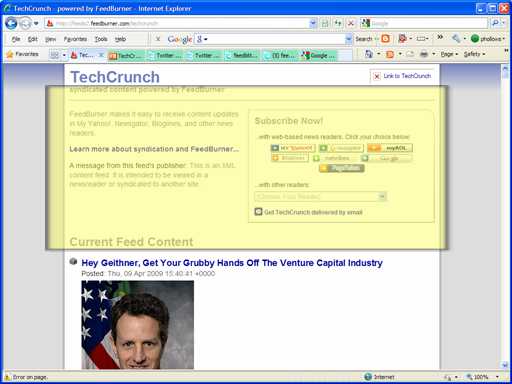 FeedBlitz browser friendly: 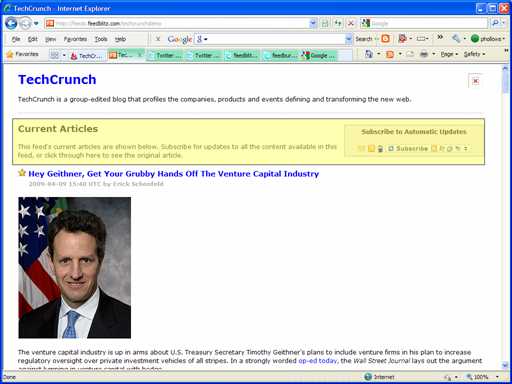 As you can see there's much less noise from us (and no mention of FeedBlitz at all in the stuff we add), and we add the feed's description. The other browser-friendly version pushes the content down and, the title at the very top aside, most of the text where the reader's eye falls first is all about the vendor not TechCrunch. Search Engine Friendly FeedBlitz's browser-friendly version also goes further than what's visible in the browser. The browser-friendly version is always served as HTML (i.e. as a web page), so it can be indexed by ordinary search engines (most, including the main Google search engine, avoid feeds in feed format, which is what FeedBurner serves browser-friendly as by default). It also includes meta tags, pulled from your feed and your post tags, for the description and keywords. Meta tags help search engines understand your content better, so having them there is a big plus. It automatically adds a feed autodiscovery link pointing back to your RSS. All while using the Smart Links I mentioned earlier. Here's the browser-friendly version of the FeedBlitz RSS feed: http://feeds.feedblitz.com/feedblitz&x=0 - use the "View Page Source" in your browser to see the SEO tags we added if you're interested. (Plus I think it just looks better for people. You know, those carbon-based life forms you're ultimately trying to reach). Better Partial FeedsFor those who use partial feeds, FeedBlitz is way ahead of anything else out there. Take a look at the browser-friendly version of this blog's feed again. I have the browser-friendly version set up to offer partial text, but if you look at the content of the posts there you'll see there are links that work. Bold text in places. Bullets. And all the flares are there. Working links is vital for SEO, because links help boost your ranking. if the links are removed then neither people nor search engine crawlers (like Google's) can get to the content you're trying to get them to. Without FeedBlitz partial feeds are literally a dead-end; a link-free wasteland that stops SEO bots and people alike. With FeedBlitz, a partial feed or browser-friendly display is suddenly a nicely presented, keyword-rich environment that that both search engines and people will appreciate. The flares all work (and they're not mangled either; they use your URL too, which is good for SEO). It's both better looking and more functional for people and machines alike. Finishing the Play - Custom Footers Finally, you can add a custom footer to all your articles with FeedBlitz (can't do that with FeedBurner). That can be an SEO-friendly link to your site. It can be a link and a copyright notice to help reduce RSS-scraping revenue theft. We use it on our feeds to point people back to this blog; any safe and valid HTML can be added. Advanced Users - NOINDEXFeedBlitz.com has a Page Rank 8 home page and as such that strength can sometimes distort SERPs. For advanced users who don't want our versions of their content to be added to indexes we offer the NOINDEX option on the RSS - Settings page. It's off by default, though (i.e. no noindex, or (that is to say) yes: please index this content). FeedBlitz RSS - Better SEOSo there you have it. If you care about SEO and want a better feed solution that will help, not hurt, your search engine optimization activities, all with next to no effort and without sacrificing metrics, choose FeedBlitz. [Reposted to address broken tinyurl] Labels: FeedBlitz, feedburner, feedburner alternative, RSS, search engine optimization, SEO
RSS and Google Analytics Integration
Sunday, April 05, 2009
FeedBlitz's new RSS service now enables bloggers, social media marketers and publishers to track RSS-driven click-throughs in Google Analytics (and also Omniture's Visual Sciences enterprise web site analytics solution). Further, FeedBlitz has made this feature available to our email marketing newsletter service as well. FeedBlitz is now the only RSS service to enable publishers to view their RSS-driven activity in these two popular web analytics packages. It's trivial to set up. For RSS feeds, go to RSS - Settings, and choose the click tracking service you want and save. For email newsletters, go to Newsletters - Settings - Content Settings - Tracking and More and pick the tracking option you want, and save. That's all you have to do. Well, ok, that and wait for the metrics to appear in your web analytics results. For the FeedBlitz RSS service, changes are immediate. Email service click-through changes are reflected in the next mailing. It's OK to specify the click through settings in both locations if you use both services; a click-through from an email based on a FeedBlitz feed will properly identify itself as being email, not RSS, driven. Looking at the results in Google AnalyticsAll the results are visible in Traffic Sources - Campaigns in your Google Analytics dashboard. For clicks that originate from your RSS feed, Google will record "FeedBlitz" as the source, "FeedBlitzRss" as the medium, and the feed path (the part of your url after "feeds.feedblitz.com") as the campaign. Pick these options from the "Dimension" drop down on that page the campaigns page. For clicks that originate from an email newsletter, "FeedBlitz" is still the source, but the medium will be "FeedBlitzEmail", the campaign will identify when the mailing went out (e.g. "Nightly 2009-04-04") and the content will identify the feedblitz list ID. Now you can easily review the effectiveness of your email newsletters and RSS feeds and determine what changing settings will do (such as switching between full and partial content, for example). Omniture Visual SciencesFeedBlitz adds the "From" parameter, enabling you to differentiate between RSS and email clicks, and similarly varies the parameters on the email side to enable you to tell which mailing led to which click through. RSS Service RecapWith this feature announcement, I want to briefly revisit our original posting announcing the service. In it I said "You'll see that the FeedBlitz RSS feed service will rapidly evolve over the coming weeks." A bold claim. How are we doing? Since that launch, about 10 days ago, this is what we've added: Commitment fulfilled. FeedBlitz is keeping its promises and not letting our RSS publishers down. If you can't say the same about your RSS service, then please register for a 30-day free trial. Tune the Blitzed version of your RSS feed and then, once you're happy, make the switch. Labels: features, FeedBlitz, google analytics, omniture, reporting, RSS, visual sciences
How to Migrate your FeedBurner Feeds
Friday, April 03, 2009
Here's a simple "how-to" for those wanting to leave FeedBurner and switch to FeedBlitz's RSS alternative: - Set up your first feed in FeedBlitz at RSS - New.
- If you have an OPML file, then go to RSS - Import and browse for the file. Pick the feed you configured in step (1) to act as a template so that all your imported feeds get your settings immediately (flares, splices etc). Great timesaver.
IMPORTANT NOTE: Correcting the prior version of these instructions, the FeedBurner OPML export will not work here as it exports the FeedBurner URLs not the feed sources (which is what you actually want). If you use the FeedBurner URLs you will end up creating a circular reference and that will make a real mess of the result. At this point you have all your feeds set up in FeedBlitz. Now you have to start the process to leave FeedBurner (FeedBlitz is in the middle of this right now - it works as advertised). For each of your feeds in FeedBurner: - Pick it from the FeedBurner dashboard;
- Click "Edit Feed Details..." at the top, just above the tabs;
- Update the URL there with the corresponding FeedBlitz feed URL;
- Save, rinse and repeat.
At this point all your FeedBurner subscribers will be reading your Blitzed feed. You have to make this change before you migrate away from FeedBurner as the "Delete Feed" process sends subscribers to the URL FeedBurner has as the feed source; if you don't go through the above steps the readers won't be sent to FeedBlitz and they won't see all your new goodies and FeedBlitz won't see any readers to report. OK, feeling brave? This is it. For each of your feeds at FeedBurner you want to migrate away: - Check you set up the feed URL to point to your new Blitzed feed.
- Click "Delete Feed..." just above the tabs.
- IMPORTANT: check that the "Use 30-day redirection" box is checked on (it is off by default).
- Click the "Delete feed" button.
- Breathe :-)
For the next 15 days FeedBurner will automatically send all your subscribers and visitors to your new feed. After that, people who still have not updated their RSS readers will get a simple, single post from FeedBurner telling them the new URL to use. 15 days later - poof, gone, readers will get a 404 file not found error. Anyone at that point who hasn't changed wasn't a real subscriber in the first place. So you basically have 30 days to get the word out (don't procrastinate!). Once you delete the feed at FeedBurner there is work you need to do to find and update links to the old FeedBurner URL. In no particular order, then, here's what you have to do: - Post about the change and tell everyone the new URL they should subscribe to.
- Update email forms and RSS links on your site with your new feed address.
- Update third party services such as FeedBlitz, FriendFeed etc. with your new RSS feed address.
- Update any widgets and plugins you have with your new feed URL (get FeedBlitz widgets at RSS - Promote your feed).
- Update your blog bios, Twitter profiles, email signatures etc. with your new feed address.
- Change your blog and web site's RSS autodiscovery links (info on this vital step at RSS - Promote your feed).
- Update any CNAMEs and redirects.
- Update any old blog posts that mention your RSS feed.
If you do switch to FeedBlitz we're happy you're here. You're not locked in; we have a similar process if you want to stop using us as your RSS provider. Remember that you do not have to use FeedBlitz RSS in order to use our email services. But we'd sure be happy if you chose to do that anyway! Any questions on the process add a comment or tweet me at @phollows Labels: FeedBlitz, feedburner, RSS
Own your RSS
Wednesday, April 01, 2009
Sometimes an objection to using a third party RSS service to help promote and improve your blog's native RSS feed is the fear that that you might "lose control" of your content, as well as losing the SEO (search engine optimization) benefits of your RSS feed. This really isn't so, even if you use FeedBurner or the new FeedBlitz RSS service. There are a couple of ways to ensure that your feed always appears under your own domain while you use FeedBlitz to run your RSS for you. Using FeedBlitz and your DNS settings (or redirects) this is a pretty simple process. Here's how: 1) Blitz your RSS feed at FeedBlitz using RSS - New to get all the branding, splicing and reporting goodness we add to your RSS feed. Let's say your blitzed URL is feeds.feedblitz.com/example 2) Let's say you want to your feed to always appear at feeds.example.com/example so that it always appears to come from you. The first part of that URL - feeds.example.com - is the host name. Enter that as the host name at FeedBlitz in the RSS - Settings screen. FeedBlitz will now serve your feed at both feeds.feedblitz.com/example and feeds.example.com/example, retaining any existing subscribers to the feeds.feedblitz.com address. Your reports for any given feed cover subscribers to all of its URLs. 3) Edit your DNS settings to so that feeds.example.com is a CNAME for feeds.feedblitz.com That's it! Your feed is clearly yours, but when your subscribers visit feeds.example.com/feedblitz they are actually being served your content by us. We'll make sure the subscription links map correctly, and - should you ever choose to leave - you don't have to worry about losing subscribers. You simply map or redirect feeds.example.com to another service, or host it yourself. There's no risk to you when you outsource to us this way. Using CNAMEs you can map multiple feeds to the same hostname that you own (so you can have feeds.feedblitz.com/topic1 map to feeds.example.com/topic1 and feeds.feedblitz.com/topic2 map to feeds.example.com/topic2 etc.) and it will all work, provided you update the hostname field for each feed you want to map in its FeedBlitz RSS settings. Alternatively, if you don't have DNS access but use webservers or systems like wordpress that allow redirects, you can also redirect your feeds (such as www.example.com/feed) with a temporary (302) redirect to feeds.feedblitz.com/example - this keeps your site as the "main" feed but tells aggregators and visitors to visit us for the content (for the time being). Whichever way you choose to do this, your RSS readers remain yours on a URL that is yours on a branded domain that is yours; yet your feed can be easily delivered, serviced and managed by us. You retain SEO and brand value while delegating RSS management and reporting to a service like FeedBlitz. Labels: FeedBlitz, RSS
RSS Feed Merging Added
Sunday, March 29, 2009
The "Splices" function of FeedBlitz has been extended in two new ways, giving you yet more choices as to how to integrate external content into your feed. RSS Feed MergeAs well as our "off the shelf" integration of Twitter, Disqus, Backlinks, YouTube and a dozen or so other services, we now have an RSS feed option. Enter the RSS feed's URL into the box and save; that RSS feed will now be merged into your feed. You can merge as many feeds as you like (a new blank row will appear each time you save). We're not trying to replicate the advanced capabilities of services like Yahoo Pipes or MySyndicaat, but we do believe that for those people who want to simply merge multiple feeds into one they should be able to do that from their core RSS service. For example, a teacher can now splice in both their school news and their school district's news into their classroom blog's feed, ensuring that parents get all they need to know about what might be affecting their child's education. Or a realtor can splice in tips for sellers from a staging blog along with their own local market insights from their own site. You can build a richer experience for your RSS readers by choosing the right content to merge in. New Splice Merging OptionWhen we launched last week, splices were only available as daily summaries, with either just the titles in a list, or both titles and the content, all placed together in a single "wrap up" feed entry. To accommodate RSS feed merging, we've added a new option, "Merge Posts into Main Feed" - which places splices into the feed (whether from RSS or any of the other services we support) based on the post's timestamp. This capability and all our splices are at RSS - Splices at http://www.feedblitz.com/. What this means for FeedBlitz Email PublishersSince FeedBlitz email is RSS based, for bloggers and new media companies that wish to bring multiple feeds into a single newsletter, now you can. Blitz your main feed and then add the feeds you want to merge in as splices. Then update your newsletter (Newsletters - Settings - Content Settings - The Basics) and you're done. Labels: features, FeedBlitz, RSS
FeedBlitz RSS: URL Parameters
Thursday, March 26, 2009
We've built FeedBlitz RSS to give publishers of all calibers choice and flexibility in how their feeds work. The RSS settings page manages almost all of these, but - aha!- there are ways for slightly more advanced users to further modify what FeedBlitz does by adding parameters into the feed URL. So, if you have selected "Browser Friendly" (which is the default), you won't see the RSS feed in your browser. But you can force FeedBlitz to give it to you anyway by appending "&x=1" to the URL, like this: Similarly, if you have disabled browser friendly, you can force FeedBlitz to give it to you anyway by setting the 'x' parameter to be zero, as in: http://feeds.feedblitz.com/feedblitz&x=0Don't forget that the mobile version is always at http://m.feedblitz.com/feedblitz (or whatever your feed is), and it always serves the mobile version no matter what parameters you send it. You can also limit the posts the feed shows by telling FeedBlitz only to show posts that include certain tags (the "inc" parameter), or exclude posts with certain tags (the " exc" parameter). The categories (or tags or labels) should be comma separated and HTTP encoded. Using the FeedBlitz feed as an example, you can do this: http://feeds.feedblitz.com/feedblitz&inc=aws,email+marketing&x=1and you'll get all the posts (if any) that are tagged wither " AWS" or " EMail Marketing" presented in XML (feed) format. Similarly, you can exclude posts you don't want, like this: http://feeds.feedblitz.com/feedblitz&exc=custom+Fields&x=0This example also forces the browser-friendly version by also adding the "x=0" parameter. An application for this? You can build category based feeds this way even if your blogging system doesn't produce them natively. The include and exclude parameters work on all three forms of your Blitzed feed (HTML, XML and mobile). Labels: FeedBlitz, RSS
A FeedBurner Alternative: Blitz Your RSS!
Wednesday, March 25, 2009
Update: FeedBurner Alternative Migration ToolsBloggers looking at FeedBlitz as a FeedBurner alternative have new tools to help simplify FeedBurner migration that automate many of the tasks involved in leaving FeedBurner. The simple step by step guides to using these tools are:
Update: FeedBurner Alternative ComparisonsA feature comparison matrix is available at http://kb.feedblitz.com/article/AA-00444/22/FeedBurner-Comparisons/FeedBlitz-and-FeedBurner-An-Overview.html
Introducing a New FeedBurner AlterantiveFeedBlitz today has opened up a brand new RSS management service to the public. Previously in private beta, the service is designed for publishers, marketers and bloggers who need:
- Greater choice in the RSS management service market;
- Better branding in their RSS feeds;
- A one-stop social media marketing solution encompassing RSS, IM, Twitter, email marketing and mobile-friendly content;
- Smarter SEO;
- A new take on metrics;
- Control over content and viral marketing.
The service is available for free to anyone on FeedBlitz's Newsletter Plus tiered email marketing upgrade. There's a full RSS service FAQ available. I'm very excited about this new offering. The RSS management market has been stagnant for years, and we intend to change that, starting now. You'll see that the FeedBlitz RSS feed service will rapidly evolve over the coming weeks as we learn more about its real-world behavior, what we inspire you (with luck!) to ask for, and what we could do better at. There are more features we have in the queue to add, and we've had some great suggestions already from the private beta that we'll be implementing. The RSS service is also a business, with a corresponding business model. FeedBlitz RSS management services are available to anyone with a Newsletter Plus upgrade, starting at $1.49 per month. If you don't use FeedBlitz for emailing, that's fine - you can run as many RSS feeds as you like through us for that $1.49. You are certainly NOT required to use our email services as well as our RSS platform, but you are required to contribute this low monthly fee at our minimum level. If you do use our Newsletter Plus email service plan, then the RSS feed service is available to you, right now, at no extra charge. Your fee now includes RSS management as part of the bundle. Meanwhile, if you're reading this using an aggregator via FeedBurner or via a regular FeedBlitz subscription, as of Wednesday evening you've actually been following the FeedBlitz version of the feed already, just routed to you via FeedBurner. Still, when you get the chance, though, please update your subscription to http://feeds.feedblitz.com/feedblitz from http://feeds.feedburner.com/feedlbitz (or http://feeds2.feedburner.com/feedblitz or even, yikes, http://feedproxy.google.com/feedblitz). You can also take a look at our new RSS service right now, by:
There's a lot happening in this service that I'll be blogging about in the coming days. Meanwhile, however, the best way to see what we're up to is to get your feet wet. So jump in! The water's lovely. And, yes, this is what I was alluding to earlier in the week, and yes, we're taking on Google. Again. We may be a little crazy, but this is definitely going to be fun…
P.S. Please use the standard contact methods and not comments for RSS support (or for any FeedBlitz service, in fact). Thanks! But feel free to send me a tweet (@phollows) if you've any ideas, bouquets, brickbats or bugs to report... Labels: FeedBlitz, feedburner, RSS
April 2007 Monthly Update
Tuesday, May 01, 2007
With a little more time in hand than last month, here's a quick update on the state of the Internet's largest blog and RSS to mail service. - Active circulation was 1,868,702, up just over 5% from last month's 1,773,615.
- Web site visits were 484,000 with 1,294,000 page views
The web metrics are actually down a little from March, but this appears to be entirely due to a noticeable drop in activity around the first week of April and the associated Easter / Passover holidays. This month I'm introducing a new set of metrics for you all - the total number of messages sent, and the maximum number of messages sent on any given day. Remember that a message is not just an email since we now support Twitter. These counts are subscriber updates, and don't include "transactional" emails that we send to verify subscriptions, update publishers etc. For April, then, the subscriber volume metrics were: - Total messages sent: 16,820,525
- Average messages sent / day: 560,684
- Peak daily messages sent: 727,143 (April 10)
FWIW so far today (May 1, 1:30 pm edt) the total is 681,883, so we may see April's peak beaten immediately. [May 2nd: Not quite! May Day's total ended up at 709,666, making it our second busiest day after April 10] Updates The PayPal issues from earlier in the month appear to have been resolved - thanks to everyone who stuck with us until that problem was sorted out. In addition, a lot of people wrote about our Twitter integration (initial post here, how to stop it here). There's more coming on this front, lots more excitement is en route. We also welcomed Jory Des Jardins to the Board; she's a fabulous addition to the firm (and I'm not saying that just because I've a Board meeting in a few minutes, honest!). A great new feature was added to FeedBlitz last month that didn't get much notice, but I think is a very useful tool, so I'm going to mention it again. If you haven't already done so, take a look at the unsubscribe report - there's some very interesting data about your subscribers there. Finally, we tweaked some features last month but I didn't blog about the changes; I'll get that done this week. Betas We're running some :-) You know how to reach me... Labels: Email, FeedBlitz, monthly update, RSS
January 2007 Update
Tuesday, February 06, 2007
January MetricsIn the prior monthly update I discussed the changes at FeedBlitz during 2006 and the milestones we'd achieved. This month, it's back to your regularly scheduled metrics. Big news, numbers-wise, was that FeedBlitz's active circulation topped one and a half million, only 4 months after we reached the million mark. The month-end value was 1,542,602, with 91,300 active RSS feeds / blogs in the service. We ended December with a circulation of 1,331,600, so January was up nearly 16% over the month before. Welcome to the over 210,000 new subscribers we're delivering to. Meanwhile, over at FeedBlitz.com, January saw just over 1.2 million page views and 466,000 visits, up from December by over 20% and 14% respectively. Tagalicious New FeaturesNew features added to the service in January were a lot about the tags (or categories or labels, depending on what your service calls them). Tag related capabilities added were: Here's a site that's using tag filtering on their email subscription form. It's exactly the usage we had in mind when we built the feature. Tags aside, we also added publisher notifications for forwarded articles, the industry's most comprehensive automatic link tracking, and syndication cloning. We also fixed a short-lived but significant subscriber count reporting bug. The pace is continuing in February, with the recent announcement of our new widgets capability. There's more en route this month, so stay tuned! Labels: Email, FeedBlitz, monthly update, RSS
New Feature: FeedBlitz Widgets
Monday, February 05, 2007
I am delighted to be able to announce the first FeedBlitz Widgets. These are widgets that allow you to bring elements of FeedBlitz to your site, and they join our existing widgets for Typepad and the new Blogger which simplify setting up email subscription services for those platforms. The first FeedBlitz widgets are automated " blogroll" widgets. Basically, when added to your web siite or blog, they automatically publish your published syndications and / or your current public subscriptions in a list. As you add or remove subscriptions or syndications, the widget changes to match. The widgets enable your subscribers to visit your favorite sites or publications, and to subscribe to them by email (using FeedBlitz, of course), or by RSS. The widgets also enable visitors to subscribe to the OPML / reading list version of the widget, so they'll automatically be subscribed to new content sources as you add them. Privacy ProtectionWe understand that there may be some subscriptions (or indeed publications) that you don't want to have appear in your widget, if you choose to use it. This is important: we're not forcing you to display your subscriptions or publications; use of the widgets is entirely optional (and way cool, of course). Nor will using a widget reveal your email address or anything else. They're just automatic lists to new subscriptions. So for publishers, if you have elected to keep your syndication out of the FeedAdvisor search results, that syndication won't appear in your publication (or subscription) widget. For subscribers, we have added a new "privacy" setting. By default all subscriptions are public, which means the subscription blogroll widget will display them (again, only if you choose to use the widget and put it online somewhere). Simply check the privacy option on for your subscription and the widget will cease to display that subscription. Easy! Note that whether a feed shows up in a widget is a function of the privacy setting for that feed. This is different from your privacy setting in your FeedBlitz profile, which shields your email address from your subscriptions' publishers. Technically Speaking The widgets are available as client side script or static HTML suitable for use in an inline frame. They are simple and fast, and shouldn't affect page rendering times significantly for the vast majority of web sites. Better yet, once you create a widget, it's cached for fast delivery. We also embed the widget with a well-defined style, so web design mavens can format it the way they want. Hosted OPMLBasically, the widgets are built on internally generated OPML. We have chosen to make that OPML visible for widget users (it's linked to the OPML icon  ). So you can now use FeedBlitz to not only share your OPML, but also host your OPML. Publishers who want an OPML service can now register with FeedBlitz, upload their OPML file and publish the widget! See it in actionYou can see live widgets right now on the FeedBlitz web site. Go to the publisher widgets page and you'll see all the FeedBlitz RSS feeds and subscriptions, published in a widget. (While you're there, why not subscribe?). Similarly, the subscriptions widget (which can automatically create your blogrolls) on this page is also live. It's my public list. It's not a very interesting blogroll (hey, nobody said I was an interesting person!), but you get the idea. Neither widget comes with a pre-defined title, so if you want to entitle that part of your site as a " blogroll", "reading list" or "my crazy links" then you can. Choice is a Good Thing. And so are widgets. Generate your widgets right now at www.feedblitz.com/f?widgetgen (log in required). And enjoy! Labels: Email, FeedBlitz, opml, RSS, Web 2.0, web_2, Widgets
|
© FeedBlitz - Blog and RSS Email Solutions | www.feedblitz.com | info@feedblitz.com | Privacy | Terms of Service
|





 posted at 11:09 AM
0 comments
posted at 11:09 AM
0 comments


