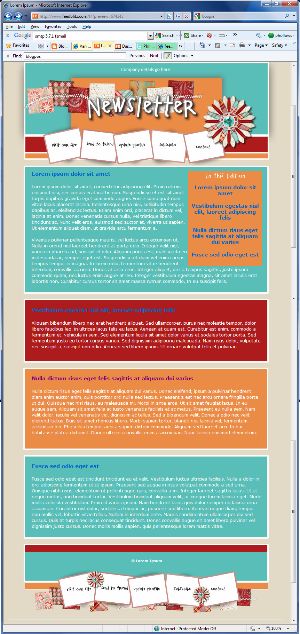
Starting this afternoon, active FeedBlitz publishers (well over 72,000 of you!) will be getting an email, letting you know that your account has been readied for the new capabilities of FeedBlitz v4.
FeedBlitz v4 is significantly easier to use than the current version, enabling you to work faster. If you've found the current FeedBlitz web site a challenge at times, then you'll find FeedBlitz v4 delivers a significant leap forward. Beyond better usability, though, FeedBlitz v4 also delivers insight into your site's entire audience across the social web.
If you have any questions about FeedBlitz v4, need help making better use of FeedBlitz in general, or just want help with your current setup, don't hesitate to contact tech support at support@feedblitz.com or read our knowledge base. We're more than happy to help.
You can always get a jump start on the new look and feel by going directly to www.feedblitz.com/f?v4 - you don't have to wait for the email to arrive!
Meanwhile, if you're curious about the changes that are a-coming, check out the video below.
FeedBlitz will become exclusively v4 in early the New Year.
In yesterday's post about setting up your RSS properly I talked about the risk of getting trapped with a particular feed service because your subscribers are subscribing to their feed URL on their domain, not your URL on your domain.
That's bad enough. What's worse in FeedBurner's case is that people may have set up their feeds years ago (or their web folks did), and they can't figure out how to access their feeds and metrics. Or, from worse to worsest (?), FeedBurner users can migrate their account to Google apps and suddenly find out that a perfectly good FeedBurner login no longer works - and can't be recovered. Not only are you trapped at this point, you have no recourse other than abandoning your feed, its subscribers and starting over. There's no corporate support for FeedBurner at all (but it's free so that's OK, right? Perhaps not...). End up at this point and you're well and truly up the proverbial creek. You're by no means alone in your paddle-less adventure, but that's cold comfort, I know.
This is a tragic turn of events for what was once a fun, supported (and supportive) service. I've written on the topic before, but as I try and provide a little help to frustrated users in the FeedBurner forums, it's sad to see so many people disappointed and frustrated by the complete lack of engagement from FeedBurner's owners. They simply don't understand why Google doesn't care about them (another instance of digital share cropping - what would happen if FeedBurner went away? Yikes...).
Sounds like an opportunity for FeedBlitz, right? Well, not so fast. People frequently can't log in to FeedBurner to use FeedBlitz's migration wizards, so they're stuck. Often, that leaves their readers sitting out there subscribed to a FeedBurner URL, with nothing that can be done by the site owner to access that audience and its stats.
Which means, as I said yesterday, that site owners have to get all those readers to resubscribe. It's the only way to get their readers off that FeedBurner URL, and the only way for the publisher to re-take control of their feed, their readership and their RSS metrics. Even with the pain and frustration many FeedBurner users are now experiencing, the fear of starting over and "abandoning" their subscribers is just too much. They give up, and resign themselves to putting up with it. The fear and lack of access put even major bloggers on the back foot, and prevents them from making a switch they'd otherwise be more than happy to make. After all, their subscribers are their most committed audience, and surely far too important to abandon to the free but unsupported service that FeedBurner has become. It's a shame to see such confusion descend into lost hope, day after day. But that's what's going on.
Good news, then. There is hope.
As I alluded to yesterday, FeedBlitz does now have a way forward for people stuck in this scenario. It ain't pretty, but it works. Our approach assumes that you have control over the original feed that FeedBurner is polling, that you can use your blog's redirect features, and that you're going to try FeedBlitz out as a premium FeedBurner alternative.
First, set up your own feed on your own domain, like I outlined yesterday, if you haven't already done so.
If that is different from your FeedBurner original feed (our tech support can help you identify the URL FeedBurner is accessing), set up a permanent redirect from that feed to the new feed you set up in step (1) above.
Then set up your FeedBlitz feed at RSS | New based on the URL you set up at (1).
Set up a temporary redirect from your feed (1) to your new FeedBlitz feed (3), making sure that you have an exception defined so that FeedBlitz can access your source feed OK without going around in circles.
At this point you have FeedBurner - and everyone using it - redirecting to your new canonical feed on your own domain (good!), and you are then having FeedBlitz serve it for you. Which means that FeedBurner (or whatever you use) is, in fact, accessing FeedBlitz for your feed. This is the key part.
(Note that at this point we don't have to log in to Google at all, so even if you can't get in, you're golden.)
The bad news is that all the people using FeedBurner will still have to resubscribe. No avoiding that without login access. Simply asking them to do it in a blog post is unlikely to have any effect; people are lazy and - hey - the FeedBurner feed's still working (although it's a lot cooler now it's using FeedBlitz's feed goodies).
So here's the kicker. FeedBlitz has a new feature in its RSS settings that will try very, very hard to FORCE all your FeedBurner subscribers - at least the ones who are actually reading your old FeedBurner feed - to change their feed settings and resubscribe.
How? Well, when you enable the FeedBurner migration option at RSS | Settings, you can edit a fairly loud and to the point message (lots of bold text and colors) that says: We've moved, update your settings, oh faithful reader! OK, not quite so Jane Austen perhaps, but you get the idea. When the setting is enabled and FeedBlitz detects FeedBurner accessing your FeedBlitz feed (courtesy of the redirects you set up above), FeedBlitz does NOT send your post to FeedBurner (and by implication, on to every subscriber using it).
No. Instead, FeedBlitz serves the "resubscribe" message. Just to FeedBurner and its subscribers; everyone else gets your regular content. As long as you have that setting enabled in FeedBlitz it will continue to (loudly, persistently, consistently) urge your remaining FeedBurner subscribers to switch over. Not for only 15 days, but for as long as you have the FeedBlitz feature switched on. So people taking long vacations, sabbaticals or whatever will still get it. Everyone accessing your content via your old FeedBurner feed will know, in no uncertain terms, what they need to do. And they will be reminded, every single time you post, until they change.
So, although it's not as smooth as you might like, there's no need to access your old FeedBurner account to switch, which is a huge win. (If you can log in we have wizards to help expedite setup and email subscriber transfer). With this capability, FeedBlitz can basically push every one of your subscribers with a pulse over to your new core feed living at your URL on your domain. You don't need to delete your old FeedBurner feed either, which means all the old links in aggregators will work too. But everyone paying attention will quickly switch because they want your content and NOT an annoying message from the likes of us. As I said, pretty it is not. Effective, though? You betcha.
Sure, not everyone will come over. You're going to have a proportion of abandoned subscriber accounts, and so at the end of the day your numbers will start off being lower here at FeedBlitz than at FeedBurner. But what you gain is:
Control over your feed and how it's served.
Knowing you have a supported, reliable service.
Knowing the people you do have are fully (re)engaged with your content.
That first point is important. You can (should!) configure the message we send to FeedBurner subscribers to direct readers to the feed on your URL (remember we still serve it, because of the temporary redirect). But you own those readers on your URL on your domain. Don't care for FeedBlitz later on? Well, switch the redirect off - done! They're still yours. They won't need to resubscribe again, because as far as they're concerned they're subscribing to the same feed.
At the risk of harming FeedBlitz's future revenue growth, you could in theory start a trial with us for the sole purpose of rescuing your feed from FeedBurner, and then cancel before the trial ends, planning on the migration message having moved anyone who cares across back to you by then. Obviously, we hope you'll stick around, but it's certainly something you could consider if you want to make that move and take back your feed. Our RSS only prices are just $1.49 a month anyway, so if you don't use our email services you're not going to break the bank if (when :) ) you choose to continue with us.
I hope this helps someone get out of the quagmire. Know that, if any of this resonates with you, at least you're not alone, and there is a way out.
If you're interested and would like help getting control of your RSS feed and your subscribers back, please tweet me @phollows or contact us via support at feedblitz dot com. We're happy to hear from you and will help as best we can, client or no.
In the first part of this three post autoresponder series I announced the following new features for FeedBlitz's autoresponders:
Custom landing pages for autoresponder subscribers;
Custom confirmation emails;
Event rules and triggers;
New "On completion" event trigger.
In the second post, I talked about our AWeber-compatible email parser capability, enabling simple third party shopping cart and form integration.
This last post shows you how to tie them all together. Here's the scenario:
You want to thank your store's purchasers with a coupon and then a three part "how to" series;
At the end of the series you want to add them to your full mailing list (so they don't get too much mail while they're in the autoresponder)
You want to do this with minimal unsubscribe or spam complaints.
Here's how.
Create your autoresponder and define the sequence of articles;
Create a custom landing page on your site where you deliver the coupon on your site, and tell the autoresponder about it;
Set up an trigger event on the autoresponder to subscribe people to your main mailing list on completion.
Use the custom confirmation (the dual opt-in activation) email to tell people that there's a coupon waiting for them and all they have to do to get is to click the confirmation link.
Set up the parser for the autoresponder to watch for notification emails from your shopping cart, which kicks the whole process off.
What happens is this.
The visitor makes a purchase from your store - hooray!
The parser picks up the notification from your shopping cart, and sends the opt-in confirmation email to the subscriber.
This opt-in email is the one you customized, telling the user about the goodies they are going to get if they click the activation link.
The user confirms, and two things happen:
The first email in the autoresponder sequence is sent.
They are sent to your custom landing page to pick up the offer.
They get remaining articles in your series over the next few days.
When the last one goes out, the "completion" event occurs, subscribing the user to your regular mailing list, where you can build upon the trust you've already created between you and the buyer.
Not much work to set up, but what you get at the end is a powerful, fully automated email marketing solution that builds trust with - and who knows, maybe some extra revenue from - your new purchaser.
Autoresponders are often used to thank people for subscribing to your mailing list, or to launch multi-step drip marketing series, or as standalone email courses sent to subscribers. These are easy to set up because all these features are inside the FeedBlitz service.
But some of the best uses for autoresponders is to add a new subscriber when they've done something outside your email service's ecosystem, such as when they buy from your online store or when you use a third party popup or widget to solicit new subscriptions.
FeedBlitz has now been extended to easily support third party shopping carts and other third party lead generation products for your site.
Introducing Email Parsers
Available at Newsletters - Settings - Email Parser and Responders - Email Parser, the approach we've adopted will be familiar to anyone who has used AWeber. Better yet, the approach will work with any third party shopping cart, widget or plugin that supoprts AWeber too, so integration is a snap. Unlike them, however, you are spared having to learn about regular expressions to make it work. Phew!
Here's a sample FeedBlitz email parser screen:
FeedBlitz generates a large, random email address (hidden in the screenshot above) for you to put into the AWeber integration's "list email address" field in your shopping cart's email service settings. Since the email is a feedblitz.com address, it will come to us.
When the email arrives, it is processed by the parser assigned to that address. You can tell it how to detect whether the inbound email is (a) genuine and (b) the kind of email you want to process (so you can differentiate between, say, a sales notification and a shipping update). If you don't know what these values are, you can use the email forwarding function (set to "Always") to get all the messages the parser receives sent on to you; you can then see what it's getting and edit it appropriately.
Then you tell the parser how the data you want to grab appears in the body of the mail itself. One per line, or PayPal style, or comma separated etc. The parser splits up the inbound email, and then looks at the matches you specify to figure out information such as the buyer's email address and their name.
When a parser's trigger matches the settings, it will create a pending subscription, populate the relevant custom fields with the data it finds, and invite the subscriber to join the list (yes, we enforce double opt-in, because it gets us better deliverability - it's a good thing).
You can set the email forwarding value to forward you the mail the parser receives. So, for example, for new email parser addresses you want to use with PayPal, set the forwarding to be "Always", tell PayPal to use that email address, and when PayPal's confirmation email is sent to the parser it will be forwarded on to you. You can confirm using the link in the email, and then go back to the parser and change the forwarding setting (if you like) to keep the noise down.
Finally, once defined, a parser can be used by any of your lists or autoresponders. The email address the parser listens to is what changes on a list-by-list basis. You cannot change the email address from the long random value which FeedBlitz assigns, and this is by design. It makes the inbound email address fundamentally unguessable and therefore highly resistant to spambots. Spammers are bad. We don't want to help them add junk to your list, which a short changeable inbound email address risks.
So, we've introduced easy to use, well behaved, AWeber compatible (at least as far as the shopinig cart or popup is concerned), easy to use parsers. Another form of API you can use at FeedBlitz, and one that anyone who's set up a shopping cart plugin, PayPal button or Cafepress store can manage. Now you can thank your buyers with drip emails, thank you autoresponders or coupons off their next purchase.
Tomorrow: How to tie parsers and the autoresponder features I mentioned yesterday together for a sweet, effective retail autoresponder solution.
Autoresponders - a predefined sequence of emails that go out to subscribers - have long been a part of FeedBlitz's offerings. Most folks using FeedBlitz, however, don't make the most of them. While that's OK, it means that many of you are missing out on one of the keys to making your blog a financial success.
Autoresponders are used by the most successful organizations and online marketers - especially those wanting to boost their affiliate earnings - to automatically market and sell to their audience on an unattended basis. Done right, autoresponders can become your blog's personal ATM. I covered autoresponders in this post in my List Building for Bloggersseries, and I'll be talking about them a lot more in the coming weeks.
Today, though, I'm going to tell you what we've been working on here at FeedBlitz to make our autoresponder program more appealing for bloggers who want to focus on more aggressive monetization and making their blogs financial successes. There is much to talk about, which is why I'm splitting things into multiple posts. Here's part 1.
Extending RSS to Email Newsletter Features to Autoresponders
In the responder tab (v3) or the autoresponder's settings page (v4), we have enabled the following features that were previously available only to automated newsletter production (blog to mail):
1. Custom landing page redirect for directly subscribing readers
Many monetization approaches have web site visitors subscribe directly to an autoresponder instead of to your general mailings list. If you want to build your list this way, you can now tell FeedBlitz where to send new subscribers once they activate instead of using our default thank you page. You can use the page you specify like you can its equivalent for newsletters: Recycling popular content, delivering incentives or rewards, etc.
2. Custom confirmation email text
You can now customize the "click here to confirm your subscription" email for autoresponders, again when the subscriber subscribes directly instead of triggering the autoresponder via a subscription to a regaulr newsletter.
3. Event rules and triggers
List automation was previously available for newsletters only. List automation events are triggered when a subscriber subscribes, unsubscribes or (this is new and only for autoresponders) when the autoresponder sequence completes. This last feature allows you to grow your list by having visitors subscribe to your autoresponder offer or campaign, and then add them to your regular mailings when the autoresponder wraps up. Doing this ensures that only one list at a time is mailing a new subscriber (first the autoresponder, and then your normal list), reducing the risk of excessive unsubscribe rates that you might run by having both lists (newsletter and autoresponder) mailing the user concurrently.
Further, we've modified event trigger functionality for all lists, such that if any trigger on any list adds a user to an autoresponder, that autoresponder will fire off the first message in the list. It didn't work that way before, which was an oversight. Oops!
Automatic for the People
(OK, yes, this is a reference to REM's breakup annoncement yesterday. I'm a fan.)
What this means to you is that FeedBlitz's autoresponders are now as rich in terms of core functioanlity as their RSS to email newsletter bretheren.
Better yet, as they like to say on late night cable TV ads, "But wait, there's more!"
And indeed there is. But that's for the next post.
One of the challenges of email is privacy and junk: People are leery of sharing their own email addresses. It's why dual opt-in is essential for maintaining your deliverability and list quality.
But this also means, as I've said before, that when someone activates a subscription to your list, they are pumped. Committed. After all, it's taken work to get themselves there.
And that little burst of excitement can now be used to help accelerate your list's growth here at FeedBlitz.
Once someone activates their subscription from the dual opt-in email, our default landing page invites them to optionally share their excitement on Facebook, Twitter and / or LinkedIn. They keep their email address private, but they share the news that they just joined your list on their favorite social media networks. As part of the notification the subscriber can create, FeedBlitz adds a link to your online subscription form. All your new subscriber's followers and friends have to do is click the link to start the subscription process to your list.
Here's what the new section of the activation landing page looks like (it's just a picture; it won't work here):
Trusted social relationships help turn that new subscriber excitement into a networked referral. That's more interest for you and, ultimately, more email subscribers more quickly.
There are also similar sharing options now available for select list owner activities too! See if you can find them...
The next version of FeedBlitz radically rethinks navigational organization for lists, feeds and social media marketing content distribution. It's faster to find what you want when you want it.
But we haven't stopped there. We've also simplified the pages used to manage your blog's email settings as well. For example, here's a screenshot of the v4 settings page for this blog.
The first thing to notice is that there's just one page - all the settings are accessible from there. They're also presented in more or less plain English, so it functions as list documentation - something that wasn't available anywhere in prior versions of FeedBlitz. To change a setting, click the linked text that refers to it, and a popup appears. Make your change there and then - easy.
Advanced users who want to get straight to brass tacks can click the "Edit Settings Inline" button and get to a more traditional, form based approach.
Next week you'll see several posts about v4 countdown ... because we're opening this baby up the week of the 11th!
A day later than promised, here's the first post in our countdown to the brand new FeedBlitz user web site. As I've mentioned before, we took on the challenge of making a great (but fairly complex) service more approachable by a wider group of people, bloggers and companies.
Put another way, the goal is to make it easier and faster for you to:
Find where you need to be;
Do what you need to get done.
The result? Well it's a lot different from the current user experience (not such a bad thing, in many ways, I know). It really, really meets these goals.
Finding Your Way Around
New Navigation
No more tabs. No more hunt and peck to find what you need. No more working through page after page to find where you need to go.
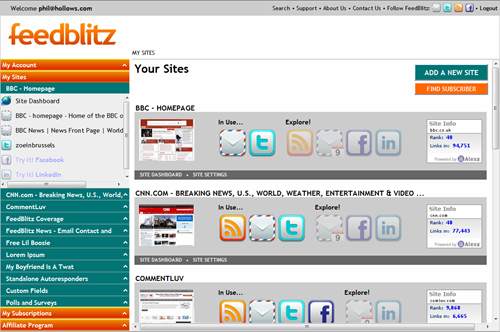
All your navigation is now in the left side bar, available all the time. Click the orange and green to open up each section; click on the titles for the relevant dashboard or the individual entry to work with that element.
All wrapped in a more contemporary look and feel with a dash of added drama.
Sites are the Key
Your content the way you think about it
When you think about your site or your blog, you think about your site or your blog. The "Site" is the intuitive way to arrange related subscriptions and social media, because that's how you think about them.
And that's how the new UI works. It organizes FeedBlitz elements the way you naturally think about them: By site. Open the site you want in the navigation and everything related to it is right there - nothing more (and nothing less). Easy to find, quick to use. There are dashboards at multiple levels (more on these in a later post), as well as site thumbnails and latest Alexa rankings.
Finally, we've also simplified some of the more complex individual pages. Mailing list settings, for example, are now presented in in english, with simple popups to change your settings right there. Fewer clicks, easier to understand what you're working on.
Existing features more readily available
The new "always-on" navigation also makes it possible for us to raise the profile of core features you may be under-utilizing or even unaware of. Custom fields and segments, for example (at the bottom of the sites area). Affiliates can jump directly to a client. You can manage your subscriptions much more easily here than before, too. There's also a new "breadcrumb" trail above the main pane and a new "utility bar" across the top.
Next up: Dashboards and Widgets
I'll cover these in the next update in a few days. Meanwhile, comments welcome!
As part of the changes that are going into the FeedBlitz v4 beta, we're not only changing overall navigation but also the way certain individual pages work as well. Some of these changes are sufficiently useful that they merit porting back to the current version.
The following changes should reduce a lot of the more common complaints we get about some of the things that FeedBlitz does!
Hope you like 'em :)
Easier resubscribes
Subscribers who used a site's subscription form to start subscribing after their subscription had lapsed used to have to log in to FeedBlitz to complete the task - a complex and confusing process for some subscribers. This is no longer true; a standard dual opt-in activation email is sent instead. One click there and they're back on the list.
Simpler dual opt-in activation emails
The default activation email (which list owners can change via Newsletters - Settings - Custom Confirmation Email) used to be verbose, and included the subscriber's email address in the activation link. This could create two problems:
The chattiness of the text confused some would-be subscribers, and
The email address confused some email apps, some of which erroneously converted the email address to a mailto: link.
If the subscriber had this second problem and clicked on the email address to activate their subscription, their app would instead fire up their email editor as if they were composing an email to themselves. Not a FeedBlitz bug, but something we can help change.
So, the text has now been dramatically reduced to improve clarity, and the email address in the copy moved outside the activation link, so users who are confirming their subscription won't be tempted to click that part of the text as they do so.
Direct subscriber change of address
List owners, when requested to change a subscriber's address, used the screens to create a request that was sent to the new subscriber to activate. A publisher-initiated dual opt-in, in effect. This was tedious and, since we know our publishers are made of the right stuff, largely unnecessary.
As of now, changing a subscriber's address via Newsletters - Subscribers - Change Subscriber Email Address will usually change the relevant email address immediately, sending a notification email that the change has been made to both the current and new addresses. No need for any activation clicks any more.
Rarely, the old "opt-in" method will still be used, depending on the status of the new address in the FeedBlitz database. This happens if something's up with the desired new address only.
Subscriber screens clarified
Some of the icons on the subscriber screens could be confusing to list managers; these have been replaced with labeled buttons instead. Much clearer.
Subscription audit data visible
A subscriber or a list manager can now access a subscription's audit data - creating IP address and referring page - in case the subscription was maliciously created. Drill down from the subscriptions page or the subscriber pages to view the data.
Clearer account merging
Finally, instructions on how to merge two accounts have been clarified. Sometimes users would feel stuck in a loop because they weren't logged in to the correct account as they tried to complete the merge.
Since posting on September (yes, it was that long ago) on FeedBlitz's UI, we've been diligently beavering away to provide the basis for a whole new user experience for email and social media marketers. The process began in earnest in October, and has been on the go ever since.
So this is the first in an occasional series of posts that will highlight where we are in the process and give you clues about where we're going. As we get closer to release I'll be telling you more about the beta versions and how you can get a jump start on using the new service.
Now Tell Me, Who Are You?
The very first step in the process was to take a long hard look at the people who use the site and why. We thought about the people we'd like to use the site, and who aren't. It's the intersection of current and future markets with the individuals who are in them. Obviously, we also added in the feedback we've received about what works about FeedBlitz as well as the parts that are tougher to use.
We eventually drew up a set of "personas" that we used to name and think about each of these users, the markets and organizations they represent. For example, there's "Bob the Blogger", "Sarah the Savvy" and "Tom the Technical" (yes, I have this tragic alliteration problem). We also have "Suzy Subscriber" representing the recipients of the content we distribute on your behalf. And ten others! Each persona has multiple attributes that cover technical sophistication, the role of social media in their online marketing, how long they've been at it and more.
When the process wrapped up we had built fourteen distinct personas - too many - but they all represented a few different classes of user. Satisfying the needs of these major user categories at a high level (and deciding which ones we're NOT going to address right now), and ensuring that we meet the needs of the personas that they contain, have been the driving force behind the work on what has become FeedBlitz 4.
A New Navigational Architecture
It would have been really tempting to go the "lipstick on the pig" route and simply pretty up the site, move a few options around and declare victory. A short term win, perhaps.
Not for us, though.
The more we thought about the personas and how these people thought about their work, their blogging and our role in their ecosystem, we realized that we couldn't just tart things up and be done. Instead, we saw an opportunity to completely rethink and realign how FeedBlitz works to more closely match the way the personas thought about and worked in their online presence. Going back to square one with the personas was the key to generating the insights we needed.
I'm not going to give away much more at this stage, but the end result has not only yielded clearer, faster and more natural navigation, but also enabled significant other usability and productivity changes we can deliver to radically simplify common pain points like simply getting started effectively and integrating social media.
(We've shown a few friends of the firm an alpha version of the new UI. Everyone has found it to be easier to use and to find what they need; and everyone has pointed out ways we can make it even better yet. Thank you!)
Still, to give you a taste of what we're up to, here's a quick example of what the new approach and new UI now enable. Instead of all the screens you see in this tutorial to set up your mailing list: www.feedblitz.com/help/tour.asp, the new UI will have exactly one screen you need to complete to get started. That's not a typo: Just one. And it does SO. MUCH. MORE.
More Than This...
So yeah, it's a pretty big deal. By taking our time and thinking about what we offer you from a wholly new perspective is liberating. We have started to flesh out a fascinating new capability that has surprised and intrigued 100% of the people who've seen it. But more on our super secret WOW factor in a later post!
With FeedBlitz 4 we firmly believe we're more than meeting the needs of our current users; better yet, we will be able to more than meet the needs of the additional target markets - and their users - that we've identified. It's exceeding my expectations across the board.
When, When, When?!
OK, such a large rethink and reimplementation requires a lot of work; we're not done. It's going to be worth it, though, so hang in there.
We have a very functional alpha version and our plan is to have a private beta of FeedBlitz 4 running next month (March) with a public beta to follow when it's ready. So, in a sense, very, very soon. A matter of weeks.
Meanwhile, stay tuned for more occasional updates on FeedBlitz v4. As we get closer I'll let out some screenshots for you; I intend to make you all as excited as I am once you get to see it!
Thanks,
The Yahoo Advertising Blog has switched from FeedBurner to FeedBlitz for new email subscriptions. To have a client like Yahoo! is great, but for everyone who isn't (yet) a public megacorporation take a look at how they're aggressively growing their list. As well as the email icon on the right, above the fold, in the subscriptions area, they also have house "ads" below each post asking the reader to subscribe. Simple text, clear call to action, big fat button. Awesome!
The blog carries good commentary beyond Yahoo's own services, so if you're a social media marketer, PR maven or online advertiser it's well worth following.
FeedBlitz's WordPress email marketing subscription plugin has been updated to help WordPress bloggers grow their email subscription lists much more quickly.
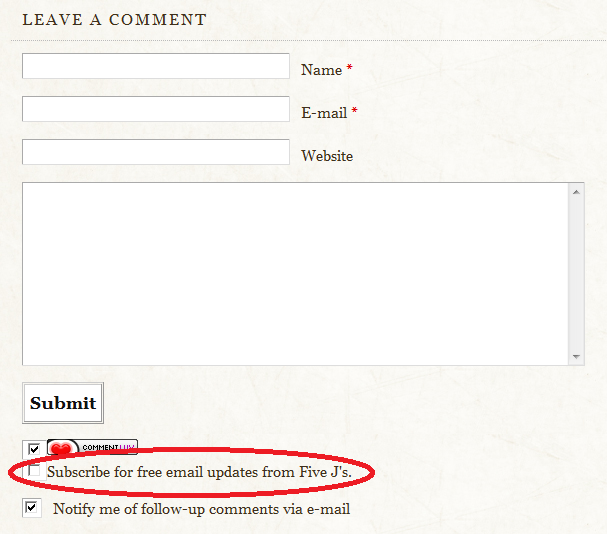
The new version of the plugin (download the wordpress email subscription zip file) adds a "get updates by email" option to comment forms. The commenter can join your list while they're making a comment with a single extra click without interrupting the comment submission workflow. It's fully compatible with other WP comment plugins such as the ever-popular CommentLuv, as shown in the screenshot below.
WordPress sites with active comment threads should find this accelerates organic list growth significantly - and it's safe, because if the commenter is already on the list we won't redundantly ask them to sign up time and again; important for your regular commenters.
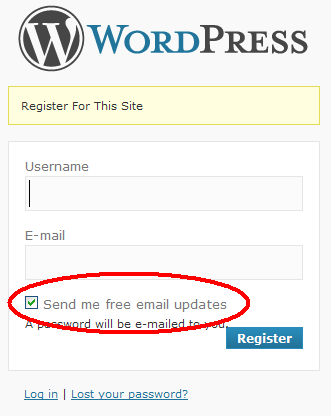
To prevent abuse and spam, FeedBlitz still requires dual opt-in, so it's best practice email marketing list management. But it's a very "low friction" user experience up front. The plug in also adds the checkbox to the user registration form for your blog, so if you require visitors to register first you can get them there as well. Here's an example:
It's customizable, easy to set up and a great way to grow that subscription database. All you need to do is download it and link it to one of your FeedBlitz mailing lists.
UPDATE: (I should have done this in the original posting and apologize unreservedly to Andy for not doing so). Andy at CommentLuv helped out by writing the commenting addition; full credit to him for the great implementation.
When it comes to list building, which used to be an email-only activity, the advent of social networks has muddied the waters a little. When thinking about your "mailing list" the concept of the "list" has expanded. And with that expansion comes the question of focus. Not the tired "email is dying" meme (it isn't), but rather where should the harried marketer focus her time now? Building Twitter followers? Growing the email list? Fleshing out Facebook pages?
The answer is, of course, to focus on what works best of you.
So the first thing you need to do is determine what "best" is. If you're building a community then you should focus on where your audience is - so that might point you towards social media. If your goal from list building is lead capture to load the sales funnel, then email may well be the best, because (a) it allows you to reach out to prospects privately and automatically, and (b) capture demographics such as location or phone number.
But when that is all said and done, how do your figure out whether your activites are making a difference? And is that difference enough to meet your definition of "best"? When you communicate with your audience, how are they engaging with you and your content? How can you compare subscriber activity in one medium, say email, with follower activity in another, such as Twitter?
Introducing the Social Media Engagement Report from FeedBlitz, which splits out your audience's activity by distribution channel. You can compare clicks from a post to your followers on Twitter with clicks from your email list to activity from your Facebook pages. You can drill into activity by channel and even down to the individual user, so, for example, you can figure out which of the Twitter accounts you post to is generating the most activity. The report is real-time, so if a power user retweets your post you can quickly see the effect of their followers clicking through.
The social media engagement report does require a little care when interpreting. For example, with Twitter, we can't reliably tell which of an account's followers clicked the link to your post; just which Twitter account the post was originally tweeted to. So although that's counted as a click in the database, you might want to mentally consider it analogous to an email list's open rate.
So which is better? Twitter, email or Facebook? Of course, the answer is "it depends" or "your mileage might vary" - but now you have the ability to compare all the outbound channels you're marketing through on a single page. And, armed with that data, you can now make informed decisions about where to focus your time, attention and money.
Remember, you can't manage what you can't measure.
Log in and go to Newsletters / Reports / Social Media Engagement Report to measure your audience's engagement, powered by FeedBlitz.
After months of responding to emails from readers saying they weren't getting my FeedBurner email updates, I decided to check out FeedBlitz. As I started looking at it more closely, I not only got excited about using a service that actually offered customer support and diagnostics, I also got excited about the branding options I'd have with their custom email templates.
Having just finished a new site design, I was excited to be able to expand that branding to my email updates as well. As a local blogger, I frequently run into readers "in real life", and many times they say "I love your email updates"! I wanted to make sure that they understood that there was also a website as well, so I designed my custom email template to look more like the site and contain more links that pointed back to my site. I got lots of compliments on how nice the new updates looked!
I'm often asked if FeedBlitz is "worth the money". Am I seeing a dollar-for-dollar return on investment? It would be hard to say definitively "yes, I'm paying $xx per month for FeedBlitz and I see exactly $xx in revenue from it", but that's almost impossible to quantify. I consider my FeedBlitz subscription fee an investment in my readers. They appreciate being able to receive the updates they requested regularly, rather than experience periodic pauses in services as I often saw with FeedBurner.
I also consider FeedBlitz an investment in my site in that I'm able to monetize the email updates by making a sponsor banner part of the custom email template. I offer site sponsorship packages and it's important to me to be able to include a nice banner for my site sponsor in my email updates, which adds value to my advertising packages.
Though I'm just starting to explore the analytics that FeedBlitz offers, I'm excited to be able to look at what's working in my email updates and what's not. Rather than just "shooting in the dark", I can implement changes and then use FeedBlitz's analytics to test what works best. Which email subject lines induce the most "opens"? What time of day are people likely to read the emails I send out?
In short, the FeedBlitz service has been well worth the money! I'm looking forward to developing my RSS to email newsletter even more, and I'm excited to see what FeedBlitz will roll out in the future.
Carrie Isaac blogs about one-thousand-and-one ways to save money in Colorado Springs at Springs Bargains. She also handles internet marketing for her husband, a Colorado Springs Realtor. You can connect with her on Twitter @carriei.
Subscriber email marketing updates from FeedBlitz can now become a lot more visually appealing thanks to a new set of custom tags available in the Advanced Template Editor (found at Newsletters / Settings / Advanced Email Template Editor). The new tag, <$BlogBlock$>, lets you define different layouts for multi-post mailings.
Up to this point, all single feed FeedBlitz templates look pretty much the same when you have multiple posts - each post has the same layout as the one that comes before. It's great for visual consistency, but if your subscriber mailings typically contain more than one post it also risks being ho-hum, aesthetically speaking. All that sameness can be a little, well, boring.
There's a reason that newspapers, magazines, brochures and web sites break up blocks of text with call outs, changing colors and backgrounds. It keeps the brain engaged and, as long as the changes aren't too distracting or jarring, makes the content easier to read and encourages you to read more.
The <$BlogBlock$> tag enables you to do the same thing with automated subscriber mailings built from your blog's feed, and while care is needed in its use, you don't have to be a programmer or rocket scientist to use it either.
How It Works
In the advanced template editor, everything between the <$BlogPosting$> tags is repeated for each post included in the mail. <$BlogBlock$> tags act inside the <$BlogPosting$> section, with the contents between the first pair being used for the first post, the contents between the second pair being used for the second post, and so on. If you have more posts than <$BlogBlock$> pairs defined, FeedBlitz will loop back and start with the first block until it's done. If there aren't enough posts to use all the blocks, the remaining blocks simply don't show up in the email, so you can safely define as many as you like; the extras aren't used.
So, as a simple example, say you simply want to change the background color for alternating posts, just like the thumbnail image above. In the Advanced Template Editor (or ATE from now on because it's getting really annoying to type), insert a <$BlogBlock$> tag immediately after your opening <$BlogPosting$> tag, and a corresponding <$BlogBlock$> tag just before the closing <$BlogPosting$> tag. At this point you have one block, not so exciting.
Now copy the contents from the starting <$BlogBlock$> to the closing <$BlogBlock$> (including the <$BlogBlock$> tags themselves). Paste what you copied between the second <$BlogBlock$> and the second <$BlogPosting$>, and voila! A second block. Change the background color for the second block, and then click the preview button.
Alternate posts will have different colors - easy! You can use this approach to change fonts, add borders, whatever you want to do to alternate posts. Here's a live three block example (which has four posts - so the first block (cyan background) is repeated for the 4th entry). It is based on a simple "Lorem Ipsum" test blog.
But you're not limited to just two blocks. You can have three. Or four - or as many as you like.
Changing layout with blocks
Or try this: Make your first block a table, width 100%. Make your second block a table that's 49% wide, floating left. Your third block 49% wide, float right. You'll need to play a little with CSS to get this right but it works great once you do.
Now your top story (the lead) is wide across the whole mail, but stories two and three are in two columns under it. Much more visually interesting! If you typically have more than three stories FeedBlitz will make story 4 wide again (because you only have three blocks), or you can define more narrower blocks to keep the other stories narrow.
More multi-block ideas
Of course, you don't have to make the columns even. You could make the left one (block 2) 60% wide and the right one (block 3) 39% wide, for example, for a slightly asymmetric look. Other uses might include:
Changing headline positions (alternating left and right justifications, for example)
Inserting ad sponsorships every Nth article (where N is the number of blocks)
It's really up to you - you can have a lot of fun with this!
Hints and Tips
Always make the first block wide if you can - the first block is used to host your subscription form, for example, as well as other subscriber landing pages we serve for you.
Experiment with a cloned copy of your list so no subscribers will be affected by your work in progress and any goofs you make as you work.
If you're trying for complex multi-column layouts, get your CSS and HTML right offline in a test HTML file first, then paste it in to the ATE's source view.
Use the editor's preview button before you save!
Once you save, send yourself a test sample email via Newsletters / Diagnostics / Test Emails.
Finally, check your subscription form to ensure that it still looks OK with your new design.
Get stuck? Contact FeedBlitz technical support and we'll be happy to help.
Publishers now have not one, not two but three great new capabilities that they can use when signing up new subscribers to email lists and autoresponders or for lead capture. They are:
Easy embedding to host the form on your site;
Custom field selection;
Custom fields in subscriber notifications.
Easy Embedding
You can now embed the complete FeedBlitz form on your site with a single line of JavaScript. The form appears as if it is on your site (which, in fact, it effectively is), styled with your fonts, colors and other CSS goodness. No iframes, no extra scroll bars, no large white spaces - just fully functional and harmonized graphic design. It's very neat, and all you need to provide is a page (it can be a simple "subscribe here" blog post if you like) to slam the JavaScript into. No programming, just copy / paste and you're good to go.
With this capability the subscriber starts the process fully on your site, which makes their lives easier and keeps the eyeballs where they belong, and, if you set the activation landing page at Newsletters / Settings / Content Settings / The Basics, the entire dual opt-in process works through your site without any side trips to feedblitz.com and without any jarring graphic design changes.
If you prefer to have the entire process on your site with 100% consistent look and feel, the embedding process is for you. Choose the embedded option from on the subscription form generator page for the code you need to copy.
Custom Field Selection
Custom fields (used for data capture, personalization and segmentation) are global to your account. If you had multiple newsletters or autoresponders you wanted folks to subscribe to, FeedBlitz always put up all the public custom fields available.
Now you can pick and choose! The default is still all custom fields, but now you can also generate versions of the same form with different options. So you can test how asking for optional or required data affects signups, simply by changing the custom fields selection and updating the form code. Or, say you have a newsletter where you want easy sign up (i.e. no custom fields) and an autoresponder that sends a white paper to new subscribers (so you're using it as a lead capture form). For the newsletter, go to Newsletters / Forms / Subscription Forms and disable all the custom fields and update the form on your site with the code generated; now FeedBlitz will only ask for the email address. For the autoresponder you can leave it at "All" (at Responders / Subscription Forms) and the lead capture code will collect all the data you require to capture (and then reward) that lead.
Now you have all the flexibility you need - and, yes, it works completely with the new embeddable form highlighted above.
Custom Fields in Subscriber Notifications
Unless disabled, FeedBlitz emails you when a subscriber joins or leaves the list. Now, if you have custom fields defined, all the subscriber's custom field data will be included in the notification message sent to you. Even if the form they used didn't contain any custom fields, FeedBlitz will send the custom field data it does have if the subscriber gave it to us as part of a prior interaction with your list(s). It will also include any hidden custom field data you added to the subscriber's record.
So there you have it - greater flexibility, better user experience and more relevant notifications. And it's only Monday... quite the way to start the week!
FeedBlitz has released its first Facebook application for email and social media marketers. Adding Facebook capabilities to its existing email, Twitter, instant messenger and Skype capabilities, the new app now enables Marketers to reach, track and engage on the world's largest social media service as well.
FeedBlitz's Facebook app features:
Automatic updating from your blog or contact email newsletter;
Updates your Wall within ~30 minutes;
Updates to your personal Wall or any Walls you manage;
Links and thumbnail images to the post and your site included;
Each update also invites readers to subscribe via email, Twitter and IM.
Not only is FeedBlitz now the only automated email, RSS and social media marketing service to offer this range of content delivery options and stats tracking, but FeedBlitz also is the only one that leverages the reach of Facebook to help you grow out your list to friends and friends of friends (depending on your privacy settings) through the automated subscription links added.
Publishers can quickly configure the FeedBlitz Facebook app at Newsletters / Mailings / Facebook.
I'm interviewed by David Siteman Garland, the genius behind The Rise to the Top which he modestly (*cough*) describes as "The #1 Non-Boring Resource for Building Your Business" (and, you know what? He's right). David and I cover many topics, including my giving some hints on FeedBlitz and email marketing best practice. We also talk about the contest we're running.
So, what are you waiting for! Click through and enjoy...
FeedBlitz and The Rise to the Top are running a contest with the winner to be announced May 5th. The lucky winner will win a free upgrade from FeedBlitz.
The catch?
It's not a random drawing. You have to tell us why you should be the one to win.







 posted at 1:41 PM
0 comments
posted at 1:41 PM
0 comments


 New Navigation
 It's customizable, easy to set up and a great way to grow that subscription database. All you need to do is download it and link it to one of your FeedBlitz mailing lists.
 After months of responding to emails from readers saying they weren't getting my FeedBurner email updates, I decided to check out FeedBlitz. As I started looking at it more closely, I not only got excited about using a service that actually offered customer support and diagnostics, I also got excited about the branding options I'd have with their custom email templates.