FeedBlitz is an email and social media subscription automation service for blogs and social media, and the premium FeedBurner alternative.
     

Get free email updates:


Preview | By FeedBlitz

top
bottom
 
 
FeedBlitz News

  
Subscribe to the FeedBlitz Blog for news, customer service and feature updates by mail or RSS.


How social media can improve your SEO by Raymond Denis

Tuesday, March 15, 2011

Social Media is definitely playing a huge role in the way people uses the Web these days. It already affects the way many people work, having permeated both home and work lives. By 2014, eMarketer estimates that 65% of all US Internet users will be using social networks.

Social media is increasing its penetration rate over years

Knowing this, Google is now using in their algorithm the "social graph" has a sign of trust. From a Web site’s persective, if you are currently increasing your Web site's ranking through the use of search engine optimization (SEO), you might be interested in knowing that social media influences your rankings for target keywords.

Here are 2 important areas where to use Social Media for SEO:

1) Make sure to have a presence on the top social media sites – regardless of where your audience is.

Remember that we are thinking SEO here. Maybe this recommendation won’t be valid in a distance future but now in 2011 it is very valid. Top social media sites like Twitter, Facebook and Youtube contains the most "authority" from a SEO standpoint – meaning that they influence Google’s social algorithm more than any other social media site. By establishing a solid presence on those platforms, you allow your site to gain more authority for target keywords on the search ranking result pages. Here are some tactics:
  • [Facebook, Youtube and Twitter] Create a customized profile page. Add your link to your Web site in your profile bio.
  • [Facebook, Twitter and Youtube] create tons of (real) friends and followers. If those sites are already related to your audience, make sure to connect your niche’s influencers and authority speakers.
  • [Youtube] Add a link in the description each time you publish a new video
  • [Facebook & Twitter] Automate updates on your profile pages coming from your blog articles or news releases.
  • [Twitter] Encourage "retweeting" articles on your Web site
  • [Facebook] Encourage "liking" pages & articles on your Web site
  • [Youtube] Encourage "subscribing" on your Web site
2) Target social media sites related to your audience.

It is crucial to be where your users are. Forums, Wikis, Blogs or any other online communities related to your niche are good places to start for influencing your site’s SEO. Why? Because: search engines give importance to signals coming from topic-related sources. Here are some tactics to consider:
  • [Forums] Contribute actively by replying to user questions. Add a search engine signal (link) in your signature or your profile page. Make sure to follow the forum rules in order to avoid being banned. All comments must be relevant and your intent must be aligned with "positive contributions."
  • [Blogs] Contribute actively by commenting on articles related to your niche. To avoid being flagged as a spammer, comments must be relevant and your intent must focus on "positive contributions."
  • [Blogs] On a niche blog, write an article on an uncovered subject or a subject that allows you to add quality or encourage debate. Leaving a signal in the article is useful for the community and is recognized by a search robot.
  • [Wikis] If your Web site or Web page is worthy of being on a Wiki page, that it can provide value to that Wiki page, you can add it in the "external links" section. Again, the intent for placing your signal must be nothing else than "informative" and "can provide value".
In conclusion, Social Media is more than just a trend – it’s a movement. You will want to think of it as an undeniable mean for connecting to your users and you will want to implement Social Media as the CORE of your Web Strategy.

About the Author

Raymond Denis is an online advertising professional working for AXA - a car insurance company in Canada. Along with managing a car insurance blog, he provides to businesses internet marketing strategies and tactics to improve online performances and goals.


Labels: ,


SEO: Three Things you must do NOW with Google Instant

Wednesday, September 08, 2010

It's all about the SEO, SEO and the SEO (search engine optimization). Google's new Instant update enables everyone to quickly grab actionable intelligence about search terms people are using, and highlights places you can instantly improve your SEO and lead generation.  It is, in many ways, all of the search term goodness buried inside Google WebMaster Tools made public, for any site, for anyone to see.

Excited? You should be! Here's how to use this data to benefit you right now.

Step 1 - Disable Search Personalization

Personalization is great - but it's going to corrupt the results from Google Instant. So you need to sign out of Google if you're logged in (links top right at google.com), or - if you want to stay signed in - do the following steps to clear your search history and turn off personalization:

1) Sign in to your google account
2) Click Settings - Account Settings, upper right.
3) Chose Web History from the products section (you may have to log in again here)
4) Clear all web history - this will also pause it.

OK, now when you use Google Instant you're seeing "pristine" results untainted by what you yourself have searched on in the past.

Step 2 - Search for your company / product / service

For each term offered, note it down (because these are popular search terms you can optimize pages on your site for later). Then view the results.

For each result on the page, if it's not a page you control, visit it and comment. Get the last word in on the top pages on Google for terms people are using to find you. Make sure your comment is relevant and links back to a resource on your site.

Repeat for each of the other terms. If other terms don't appear, try adding a space at the end - you'll get them then!

At the end of this process you should have a presence and link on all of the top pages returned for the top five search terms about your business.

Step 3 - Repeat for competing companies, terms and products.

Same process, different search. Now if people are looking for those other guys, you have a presence there too.

And, the bonus action item:

Step 4 - Start a quick-hit SEO project

Tune your site for these terms, add pages where you need to and comment and link away.

We noted the pages that were returned - now you need to get your pages into the top slots organically.  This is a longer haul and may take weeks or months to bear fruit, but start anyway. Consider hiring a reputable SEO consultant to help. This isn't a quick hit and isn't free, but if you're not where you want to be on those search results it's a great investment.

So why are you still here, reading? Go do it!

Labels: ,


RSS and SEO - Raising the Bar

Tuesday, April 07, 2009

When I announced FeedBlitz's FeedBurner competitor last week, one of the claims I made was that, as a FeedBurner alternative, FeedBlitz's RSS service offered better SEO (search engine optimization). A commenter asked me to back up those claims, which I'll do here.

For those who aren't sure, SEO is all about getting pages form your site to appear as close to the top of the search engine results pages (aka SERPs) as possible. The closer to the top you are the more visitors you get to your site because people tend to only visit the top few sites on the first page. The key to SEO is, first and foremost, writing good content. Without that you're sunk. But with good content you can then start to focus on keyword targeting and links, which are the bread and better of any SEO exercise.

And it's here where FeedBlitz's RSS services can really make a difference when compared to FeedBurner or the standard feed sent out by your blog.

Smart Linking

When FeedBlitz manages your RSS we collect data about your readers and can track what they click on. This gives you reach and activity metrics which are essential to better understanding your audience. To do that, however, FeedBlitz and FeedBurner (with click through tracking enabled) need to alter the links on your feed so we can track the visitors as they click. And the problem from an SEO perspective is that the links look like something like this: http://feeds.feedblitz.com/~/10655/0/feedblitz - mostly codes and numbers bearing little relationship to your original post. Yuck!

That's crummy for SEO, unlike the typical link on your blog, which often has keywords in it because of the way blogs work. For example, the ultimate address for the tracking link above is actually http://blog.feedblitz.com/2009/04/rss-and-google-analytics-integration.html

How then to track metrics (which is a good thing) and be SEO-friendly?

FeedBlitz to the rescue. Our links now include the post title in the tracking link. The link that appears in the FeedBlitz feed for the analytics post above is not the one I gave you a couple of sentences ago. It's actually this: http://feeds.feedblitz.com/~/10655/0/feedblitz~RSS-and-Google-Analytics-Integration This is great for SEO - your post title is in the link, and titles are keyword rich environments that search engines like, but you get the benefits of our tracking it and building RSS subscriber metrics for you. So now you don't have trade tracking for SEO - with FeedBlitz you get both, automatically, with zero effort in your part.

These SEO-friendly smart links appear in your RSS feed, its browser-friendly version, and the mobile version. They're completely compatible with our unique Google Analytics integration, CNAMEs and any other redirection strategies you employ on your own site.

Better yet, since your RSS feed is the source for resyndication out to third party sites, you get the downstream SEO benefits of when the post is linked to elsewhere by folks reading it in their feeds.

Better Browser Friendly

When a person hits your feed they'll get a "browser-friendly" version - it's HTML, not XML, and is much more accessible for humans than for computers. FeedBurner has this too, but by default it isn' t HTML. The data format matters, and I'll get to that in a moment.

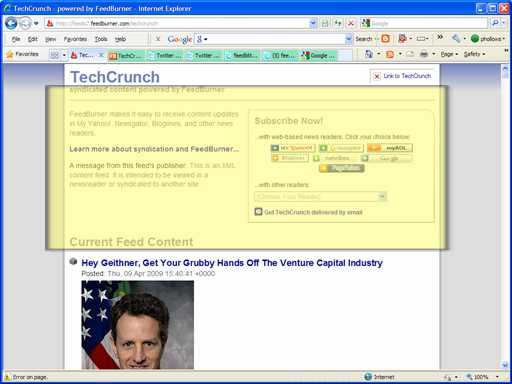
But first, you need to know one of the things that can influence a page's rank in SEO is where the content - and the keywords that the search engines are looking for - appear on the page. Usually, the closer the content to the top of the page, the better. If you look at a browser-friendly version of a feed (try this one about Barack Obama: http://feeds.feedblitz.com/barackobamaradar&x=0 ) you'll see that the page is all about the content; the only part that specifically mentions FeedBlitz is at the very bottom of the page. Great for SEO. Compare and contrast that with the FeedBurner equivalent (here's social media mega site TechCrunch's feed: http://feeds2.feedburner.com/techcrunch ). It's pretty much all FeedBurner up top there, above the fold, not Mr. Arrington's content. Great for FeedBurner; less so for you, the content owner.

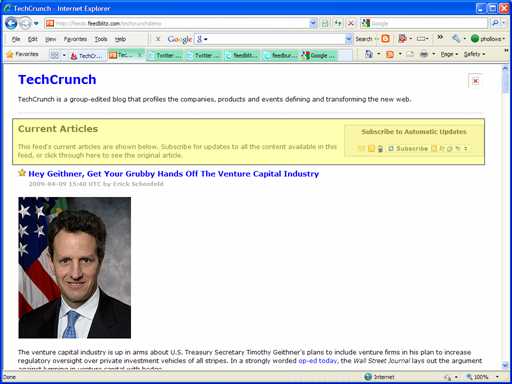
Or, in pictures, using TechCrunch to Blitz a demo feed for an apples to apples comparison, with the "noise" added by each respective service highlighted using a 1024x768 window:

FeedBurner browser friendly:


FeedBlitz browser friendly:


As you can see there's much less noise from us (and no mention of FeedBlitz at all in the stuff we add), and we add the feed's description. The other browser-friendly version pushes the content down and, the title at the very top aside, most of the text where the reader's eye falls first is all about the vendor not TechCrunch.

Search Engine Friendly

FeedBlitz's browser-friendly version also goes further than what's visible in the browser. The browser-friendly version is always served as HTML (i.e. as a web page), so it can be indexed by ordinary search engines (most, including the main Google search engine, avoid feeds in feed format, which is what FeedBurner serves browser-friendly as by default). It also includes meta tags, pulled from your feed and your post tags, for the description and keywords. Meta tags help search engines understand your content better, so having them there is a big plus. It automatically adds a feed autodiscovery link pointing back to your RSS. All while using the Smart Links I mentioned earlier. Here's the browser-friendly version of the FeedBlitz RSS feed: http://feeds.feedblitz.com/feedblitz&x=0 - use the "View Page Source" in your browser to see the SEO tags we added if you're interested.

(Plus I think it just looks better for people. You know, those carbon-based life forms you're ultimately trying to reach).

Better Partial Feeds

For those who use partial feeds, FeedBlitz is way ahead of anything else out there. Take a look at the browser-friendly version of this blog's feed again. I have the browser-friendly version set up to offer partial text, but if you look at the content of the posts there you'll see there are links that work. Bold text in places. Bullets. And all the flares are there. Working links is vital for SEO, because links help boost your ranking. if the links are removed then neither people nor search engine crawlers (like Google's) can get to the content you're trying to get them to. Without FeedBlitz partial feeds are literally a dead-end; a link-free wasteland that stops SEO bots and people alike.

With FeedBlitz, a partial feed or browser-friendly display is suddenly a nicely presented, keyword-rich environment that that both search engines and people will appreciate. The flares all work (and they're not mangled either; they use your URL too, which is good for SEO). It's both better looking and more functional for people and machines alike.

Finishing the Play - Custom Footers

Finally, you can add a custom footer to all your articles with FeedBlitz (can't do that with FeedBurner). That can be an SEO-friendly link to your site. It can be a link and a copyright notice to help reduce RSS-scraping revenue theft. We use it on our feeds to point people back to this blog; any safe and valid HTML can be added.

Advanced Users - NOINDEX

FeedBlitz.com has a Page Rank 8 home page and as such that strength can sometimes distort SERPs. For advanced users who don't want our versions of their content to be added to indexes we offer the NOINDEX option on the RSS - Settings page. It's off by default, though (i.e. no noindex, or (that is to say) yes: please index this content).

FeedBlitz RSS - Better SEO

So there you have it. If you care about SEO and want a better feed solution that will help, not hurt, your search engine optimization activities, all with next to no effort and without sacrificing metrics, choose FeedBlitz.

[Reposted to address broken tinyurl]

Labels: , , , , ,


© FeedBlitz - Blog and RSS Email Solutions | www.feedblitz.com | info@feedblitz.com | Privacy | Terms of Service

Related Posts with Thumbnails Quantcast